 Ayesha Khan
Managing inventory through Fulfilled by TikTok (FBT) can simplify order fulfillment, but what happens when your shipment reaches the wrong warehouse, cartons arrive late, or inventory goes missing?
These problems can create TikTok Shop FBT inbound incidents, leading to processing fees, inventory discrepancies, and fulfillment delays.
Customer returns add another responsibility. Sellers need to understand which returns appear in the FBT dashboard and how to track them.
This guide explains how to handle TikTok Shop FBT inbound incidents and customer returns, using real dashboard examples to help you identify problems, review fees, investigate missing units, and manage returns more effectively.
What Are TikTok Shop FBT Inbound Incidents?
TikTok Shop FBT inbound incidents are problems identified when inventory is shipped to or received by a TikTok fulfillment facility.
Fulfilled by TikTok, sellers send inventory to designated warehouses, where TikTok handles storage and fulfillment for eligible customer orders.
However, shipments must follow TikTok’s inbound requirements.
An incident may occur when:
Inventory reaches the wrong warehouse.
Cartons arrive outside the required delivery window.
Received quantities do not match the inbound shipment plan.
Goods arrive damaged or incorrectly labeled.
Shipment documentation or routing requirements are not followed.
According to TikTok Shop’s FBT inbound requirements, sellers must follow assigned warehouse destinations, quantity requirements, and delivery timelines. Noncompliance can result in inbound exceptions or additional charges.
These incidents matter because they can affect how quickly inventory becomes available for sale.
For broader inventory management guidance, How to Fix TikTok Shop FBT Inventory Health Issues can help you.
How to Find Inbound Incidents in TikTok Shop FBT
The FBT dashboard provides an overview of reported inbound incidents and their current statuses.
To review them, sign in to your TikTok Shop account, open the FBT management interface, and locate the Inbound Incidents section.
The exact navigation may vary depending on your Seller Center interface and region.
Step 1: Review Your Inbound Incident Dashboard
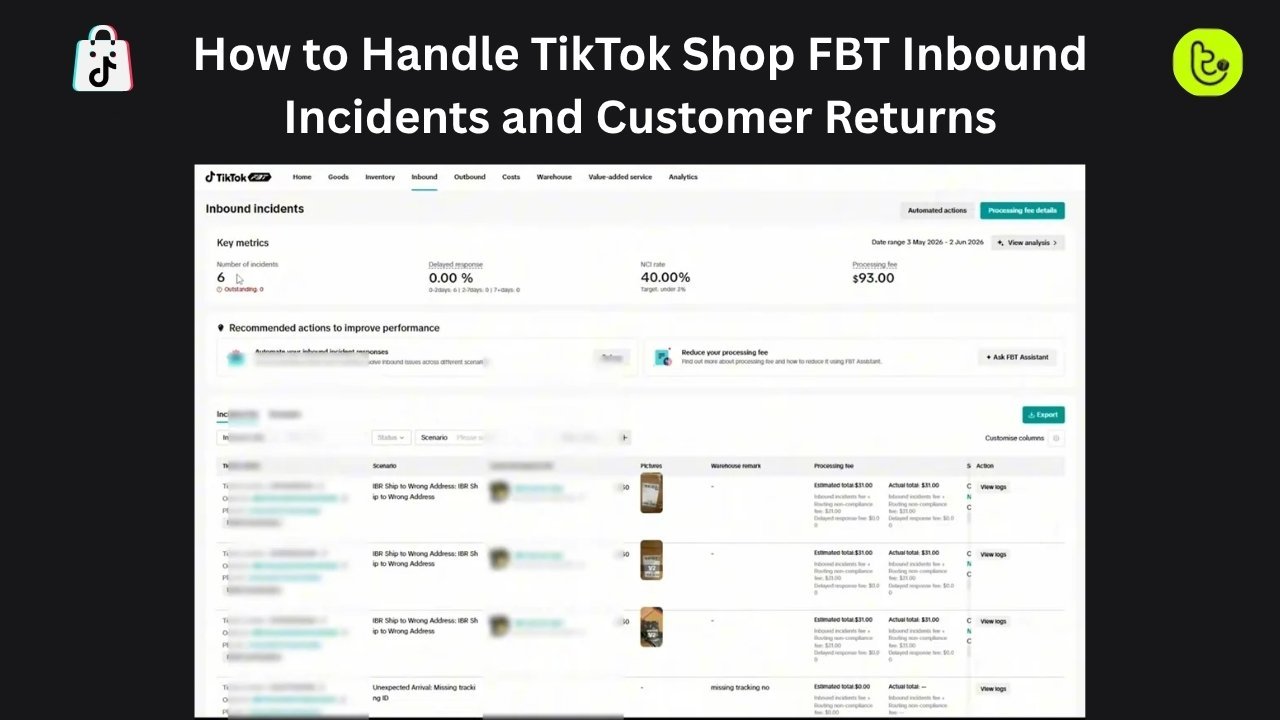
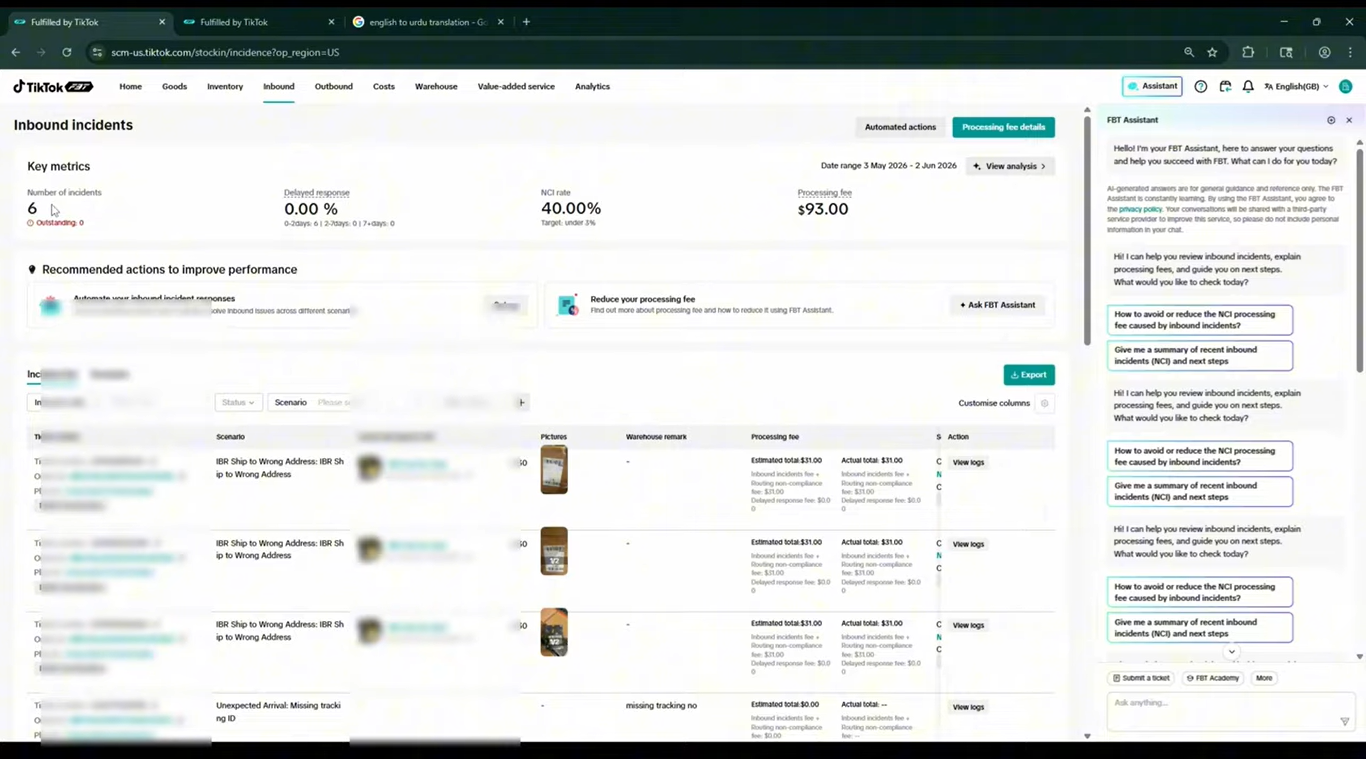
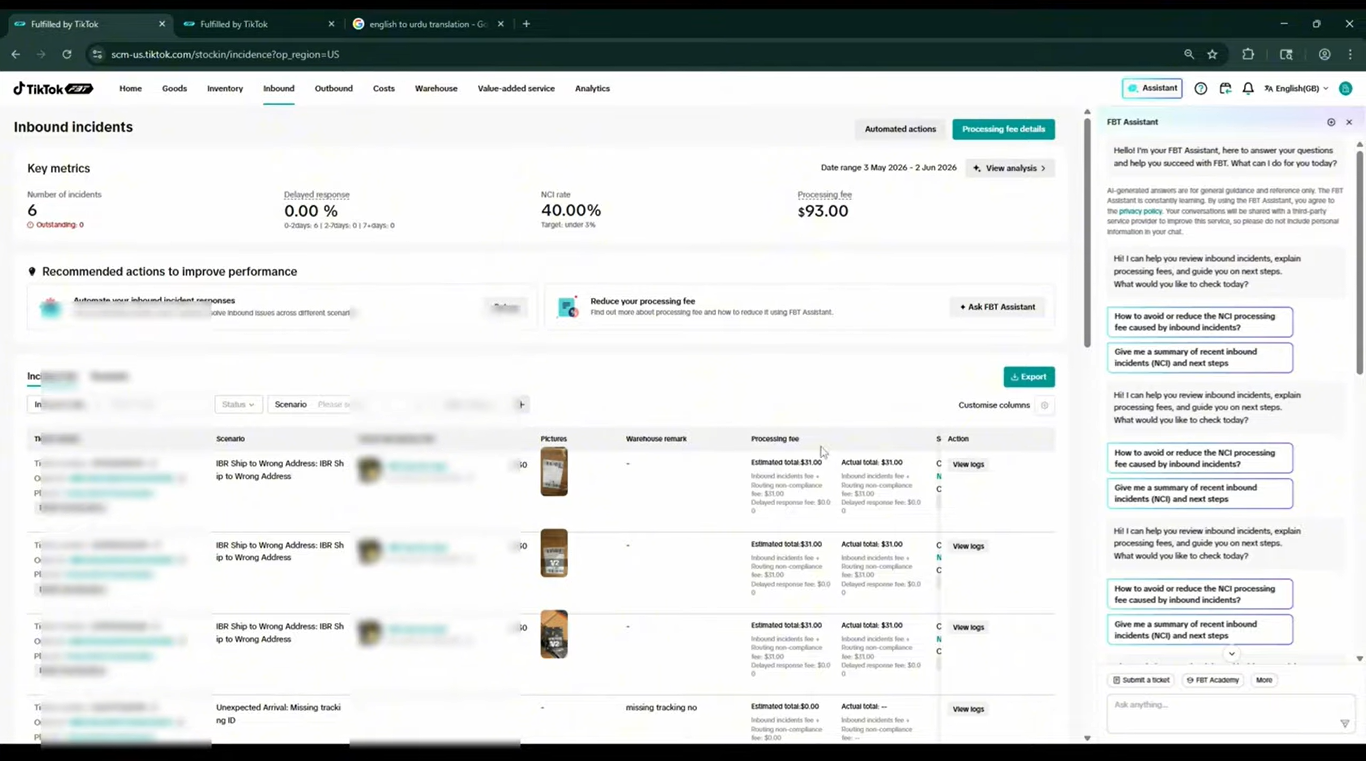
The first screen in the video displays an overview of shipment-related incidents.
In the example, the dashboard shows six reported inbound incidents.
It also includes information about delayed responses, the noncompliant incident (NCI) rate, and processing fees.
Source: Tiksly
The dashboard helps sellers identify how many shipment issues require attention.
An incident count does not necessarily mean every incident remains unresolved. Sellers should review the individual ticket statuses to determine which cases are still active.
Step 2: Understand the Inbound Incident List
Below the dashboard overview, TikTok displays individual incident records.
These records help sellers identify the shipment involved and understand the reported problem.
Dashboard Field | What It Tells You |
|---|---|
Ticket Number | Reference number for the reported incident |
Order or Inbound Request ID | Identifies the affected inbound shipment |
Plan ID | Connects the incident to its inbound shipment plan |
Scenario | Describes the type of shipment problem |
Goods | Identifies the affected inventory |
Discrepancy | Shows differences between planned and received quantities |
Information and Pictures | Provides supporting shipment evidence |
Warehouse | Identifies the warehouse associated with the incident |
Remark | Displays additional incident information |
Processing Fee | Shows applicable charges |
Status | Indicates the incident’s current resolution stage |
Source: Tiksly
Reviewing these details helps sellers determine whether an issue involves routing, inventory quantities, delivery timing, or another receiving problem.
Common TikTok Shop FBT Inbound Incidents and How to Handle Them
Not every inbound incident requires the same response.
Understanding the specific scenario helps sellers decide what to investigate and which records to review.
1. Inbound Shipment Delivered to the Wrong Address
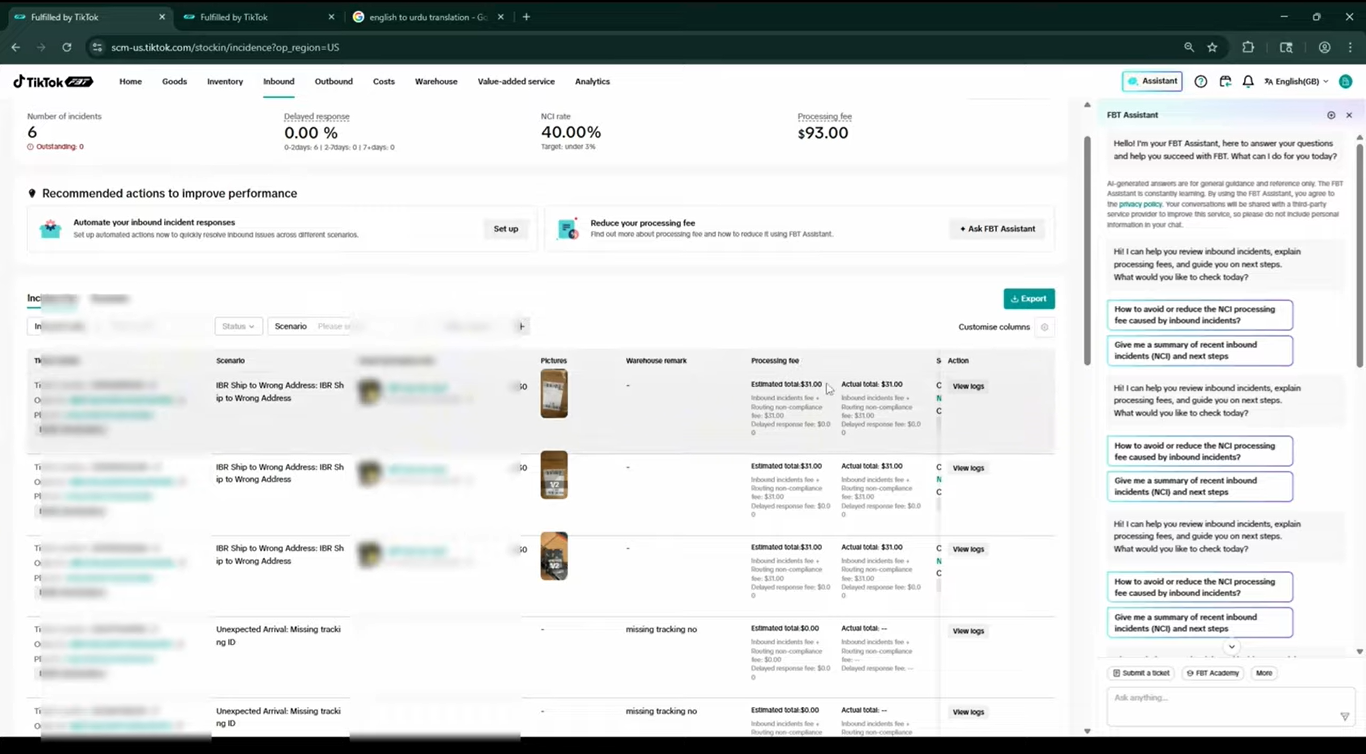
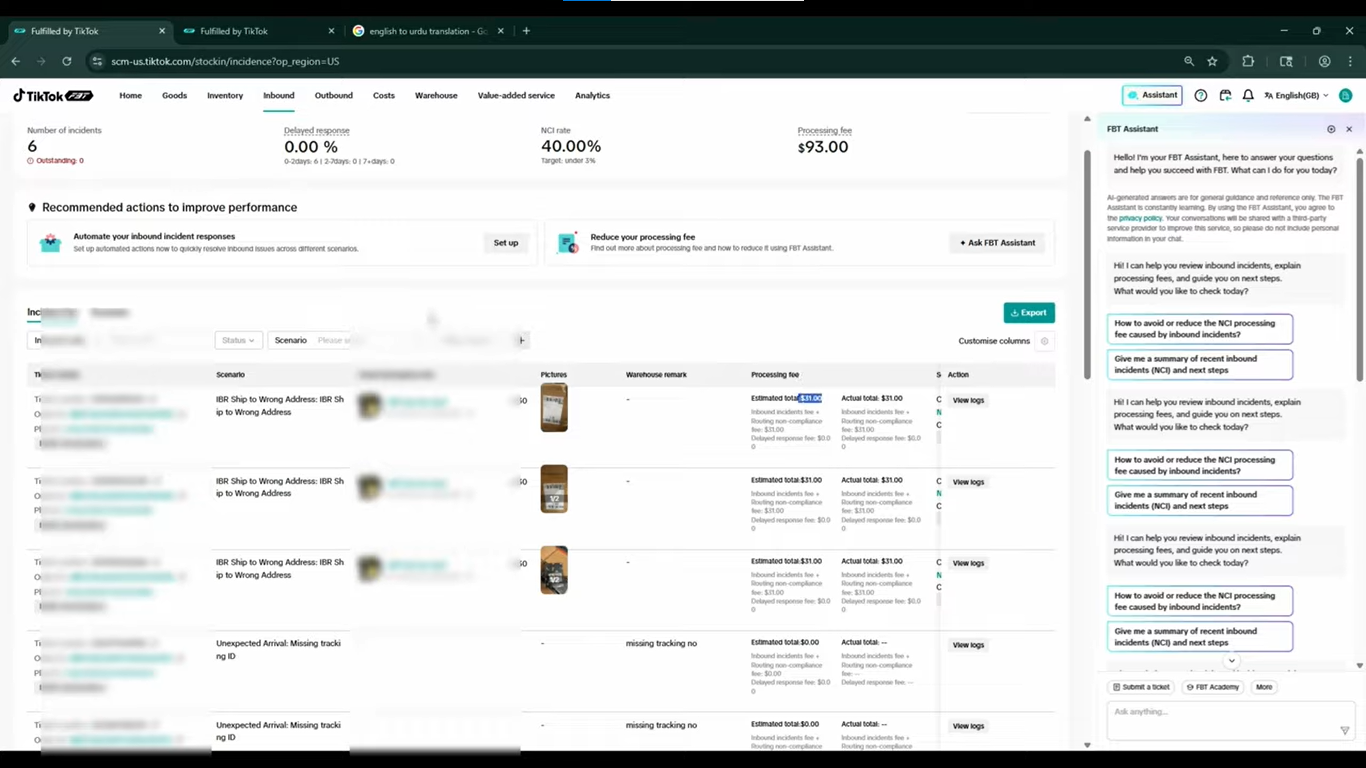
One example in the video shows an incident labeled “IBR shipped to the wrong address.”
This means the shipment was sent to a destination that did not match the assigned inbound request.
TikTok provides supporting evidence, including a photograph of the shipping label.
Source: Tiksly
How to Handle a Wrong-Address Incident
Start by reviewing the assigned warehouse address in the original inbound request.
Compare that information with the shipping label and carrier tracking details.
If the shipment was sent to an incorrect destination, determine whether the error occurred during shipment preparation or transportation.
Next, review the incident status and any processing fees.
In the video’s example, the incident was marked as solved, and the presenter explained that TikTok had charged a fee to handle the routing problem.
However, sellers should not assume every incorrectly routed shipment will automatically be transferred to the correct facility.
The outcome depends on the incident and TikTok’s applicable procedures.
Important: Always confirm the assigned warehouse before dispatching inventory. Sending goods to the wrong location can result in additional handling costs.
2. Late Cartons and Delayed Inbound Shipments
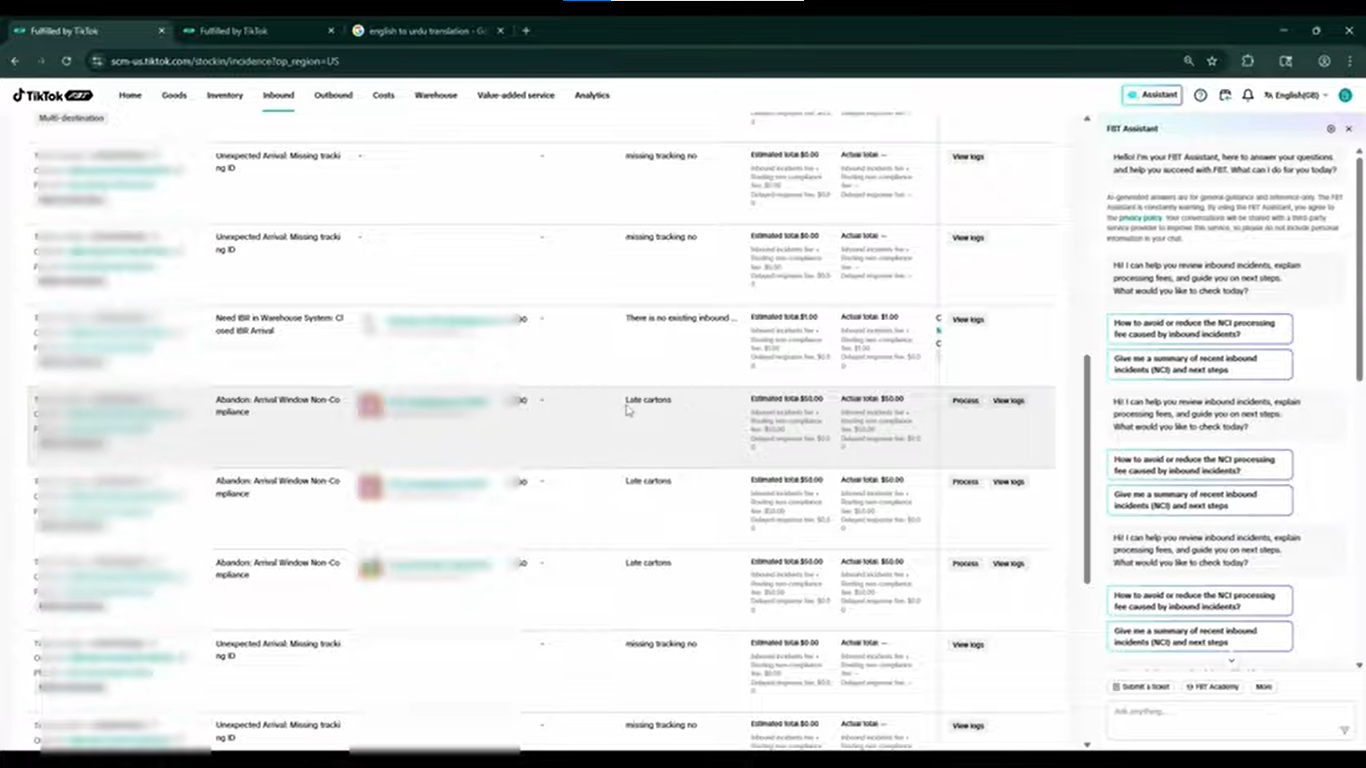
Another incident in the video involves late cartons.
The example shows a $50 processing fee associated with the incident.
Source: Tiksly
Late cartons can create problems when shipments do not arrive within TikTok’s required delivery windows.
Under the October 2026 U.S. FBT inbound guidance, all cartons for a single-hub inbound request must arrive within seven days of the first carton’s arrival. Multi-destination plans have separate timing requirements.
How to Handle Late Cartons
First, review the expected delivery date and carrier tracking information.
Check whether all cartons associated with the inbound request have arrived.
If cartons remain in transit, coordinate with the carrier and review whether the estimated arrival information needs updating.
For future shipments, ensure that cartons belonging to the same inbound request are dispatched and delivered within the applicable time limits.
Note: The $50 fee is specific to the video example. Actual fees depend on the incident category and applicable TikTok rate card.
Sellers can review current charges in the official FBT rate card.
3. Missing Inventory and Quantity Discrepancies
Inventory discrepancies are another important problem sellers may encounter during FBT receiving.
A discrepancy occurs when the quantity recorded as received differs from the quantity planned for shipment.
For example, suppose you create an inbound plan for 110 units.
If TikTok records only 100 units as received, the dashboard may show a discrepancy of -10 units.
This indicates that ten fewer units were recorded as received than originally planned.
However, it does not automatically prove that the units were permanently lost.
The inventory may still be undergoing receiving, reconciliation, or investigation.
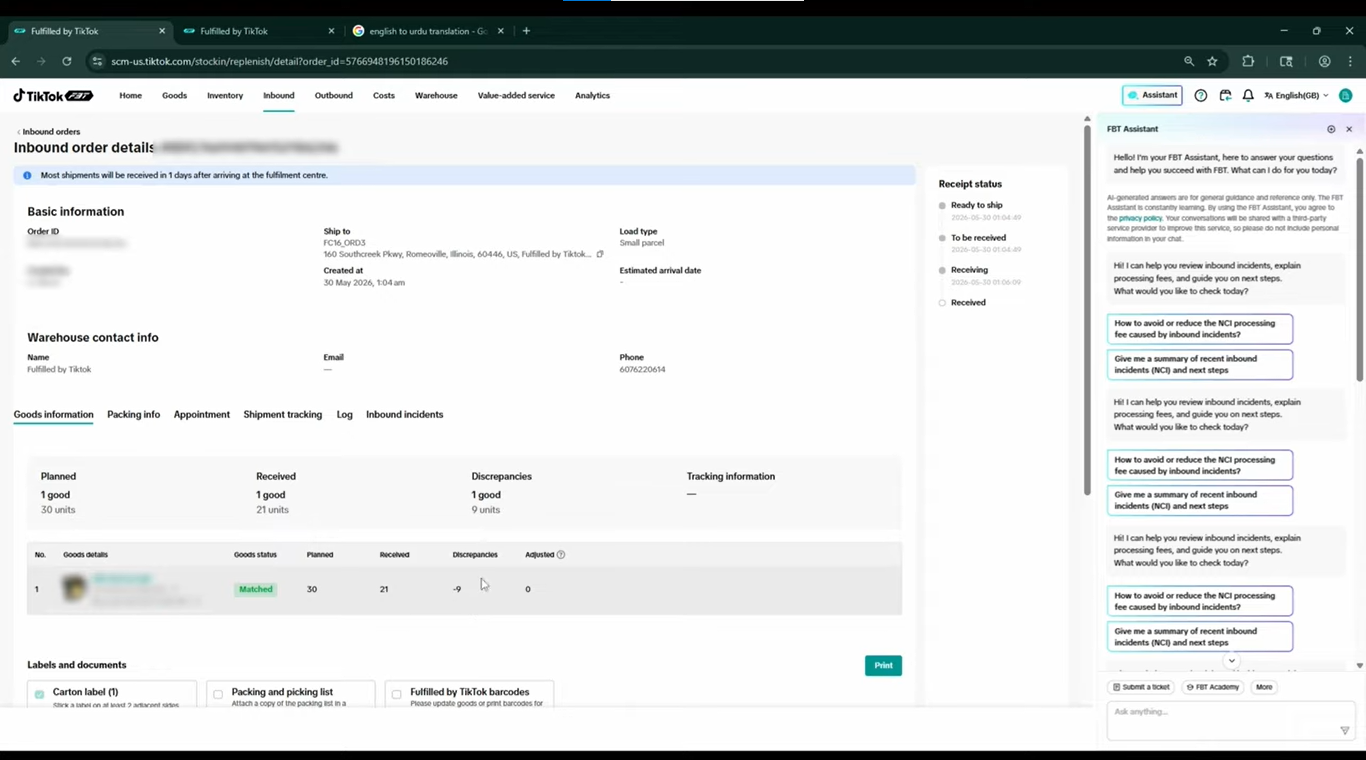
Real Example: 30 Units Planned, 21 Received
The video demonstrates another inbound shipment with the following quantities:
Inventory Detail | Quantity |
|---|---|
Planned inventory | 30 units |
Received inventory | 21 units |
Discrepancy | -9 units |
The difference indicates that nine units were not reflected in the received quantity at the time shown.
Source: Tiksly
How to Investigate Missing FBT Inventory
Begin by comparing the planned inventory quantity with the quantity received.
Then review the associated inbound incident and shipment tracking details.
Check whether the warehouse has completed receiving and putaway.
If the difference remains unexplained, contact the carrier or freight forwarder to confirm whether all cartons and units were shipped and delivered.
TikTok’s FBT Seller Reimbursement Operation Manual recommends investigating possible short shipments, incomplete putaway, and inventory adjustments before submitting reimbursement requests.
This helps prevent sellers from filing claims for inventory that has not yet completed processing.
For additional guidance on improving TikTok Shop FBT inventory performance and capacity, give this guide a read.
How to Review FBT Inbound Order Details
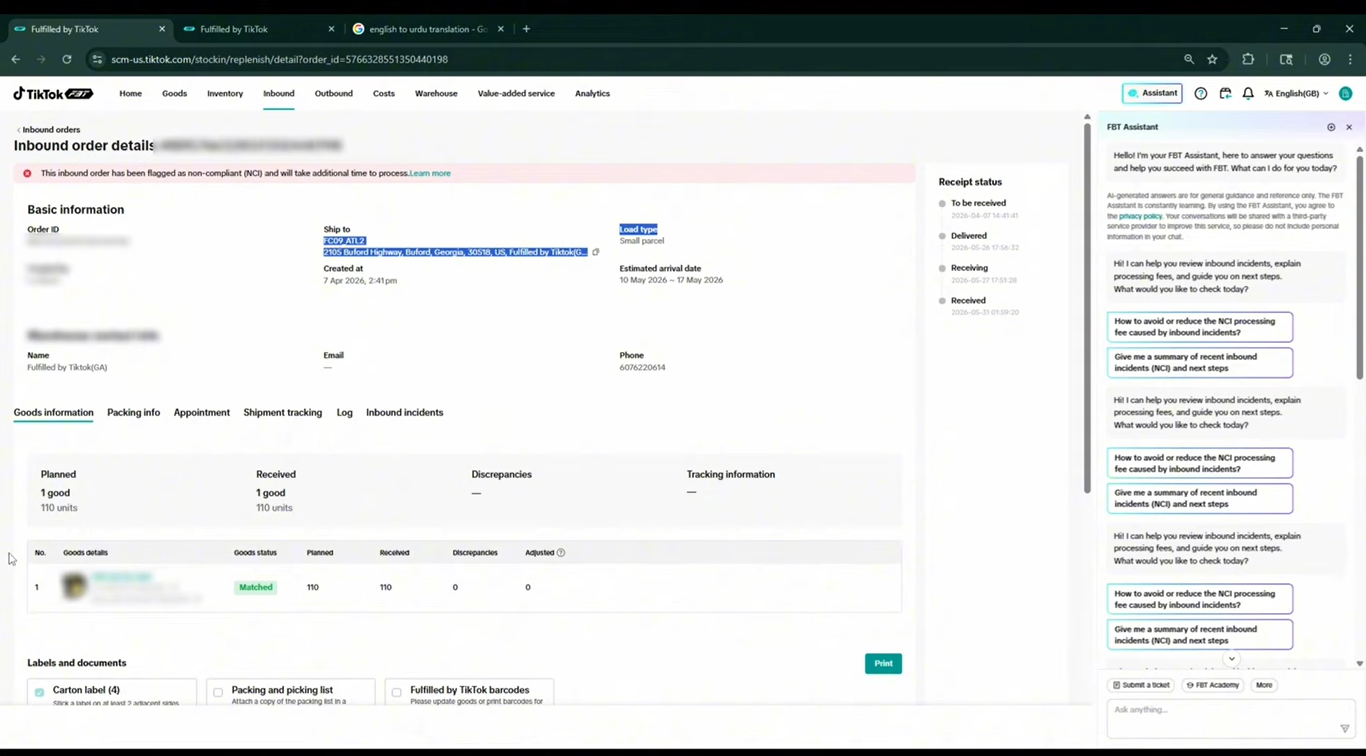
Once you identify an incident, open the associated inbound order or request to investigate further.
The video demonstrates how sellers can access shipment-specific information directly from the incident list.
Step 1: Open the Affected Inbound Order
Select the relevant incident record.
The order details screen may display:
Inbound order or request ID
Shipment destination
Order or request type
Creation details
Goods information
Tracking information
Received discrepancies
Source: Tiksly
Step 2: Compare Planned and Received Inventory
Open the goods details and discrepancy information.
Compare the planned quantities against the warehouse’s recorded received quantities.
A negative discrepancy means fewer units have been recorded as received.
A positive discrepancy indicates that more units were recorded than planned.
Check whether the difference is associated with a particular SKU, carton, or receiving event.
Step 3: Review Supporting Evidence
Inspect any photographs, shipping labels, tracking records, or warehouse remarks.
These records may help explain the incident.
For example, a photograph of an incorrect shipping label may support a wrong-address incident.
A carrier delivery record may help investigate whether cartons arrived at the assigned facility.
Step 4: Check the Resolution Status
Return to the incident list and review the ticket status.
In the video’s example, one incident displays a Solved status.
Source: Tiksly
A solved status indicates that TikTok has marked the incident as resolved.
However, sellers should still verify the inventory records and any applicable charges.
An incident being closed does not necessarily mean every associated inventory discrepancy has been corrected or reimbursed.
How to Handle Unresolved FBT Inbound Incidents
Sometimes an inbound incident remains unresolved, or the seller disagrees with the recorded discrepancy.
In these situations, additional investigation may be necessary.
Step 1: Identify the Exact Problem
Determine whether the issue involves missing inventory, damaged goods, an incorrect warehouse, delayed cartons, or another receiving problem.
Record the relevant inbound request ID, affected SKU, and discrepancy quantity.
Step 2: Gather Supporting Documents
Useful evidence may include carrier tracking records, proof of delivery, shipment labels, commercial invoices, and bills of lading.
The required documentation depends on the claim category.
Step 3: Check Whether a Reimbursement Claim Is Appropriate
If inventory appears lost or damaged, review TikTok’s reimbursement eligibility requirements.
For applicable inbound inventory issues, TikTok identifies the following support-ticket category:
FBT Issues > Inbound Order Issues > Inbound Exception – Missing, Extra, Incorrect Units
Sellers should select the category that matches their actual issue and provide the requested evidence.
Step 4: Monitor the Ticket
After submitting an eligible claim, check its status through the FBT Ticket Center.
TikTok’s reimbursement manual states that complex inventory-related reimbursement cases may take 7–21 business days, although timelines can vary.
Keep the original incident number and supporting documents available until the case is resolved.
How to Manage TikTok Shop FBT Customer Returns
Inbound incidents involve inventory entering TikTok’s fulfillment network.
FBT customer returns, on the other hand, involve products that customers return after purchasing them.
These processes are connected to inventory management but appear in different sections of the FBT interface.
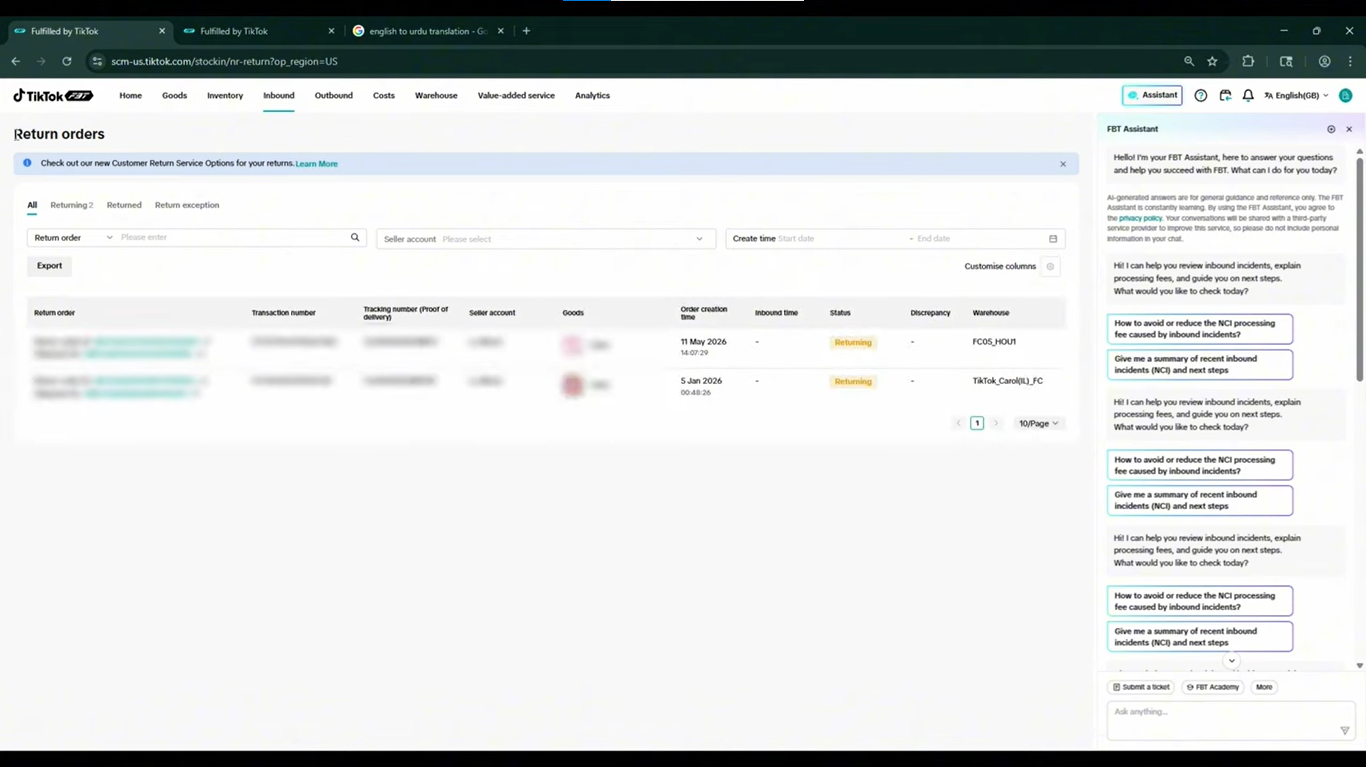
Step 1: Open the FBT Return Orders Section
In the video, the presenter navigates from Inbound Incidents to Return Orders.
This section displays customer return records associated with FBT-fulfilled orders.
Source: Tiksly
The dashboard example shows two return records.
These represent customer returns associated with orders fulfilled through TikTok’s FBT service.
The FBT return dashboard should not be confused with the broader Seller Center returns and refunds interface, which may include orders fulfilled through other methods.
Step 2: Review the Customer Return Records
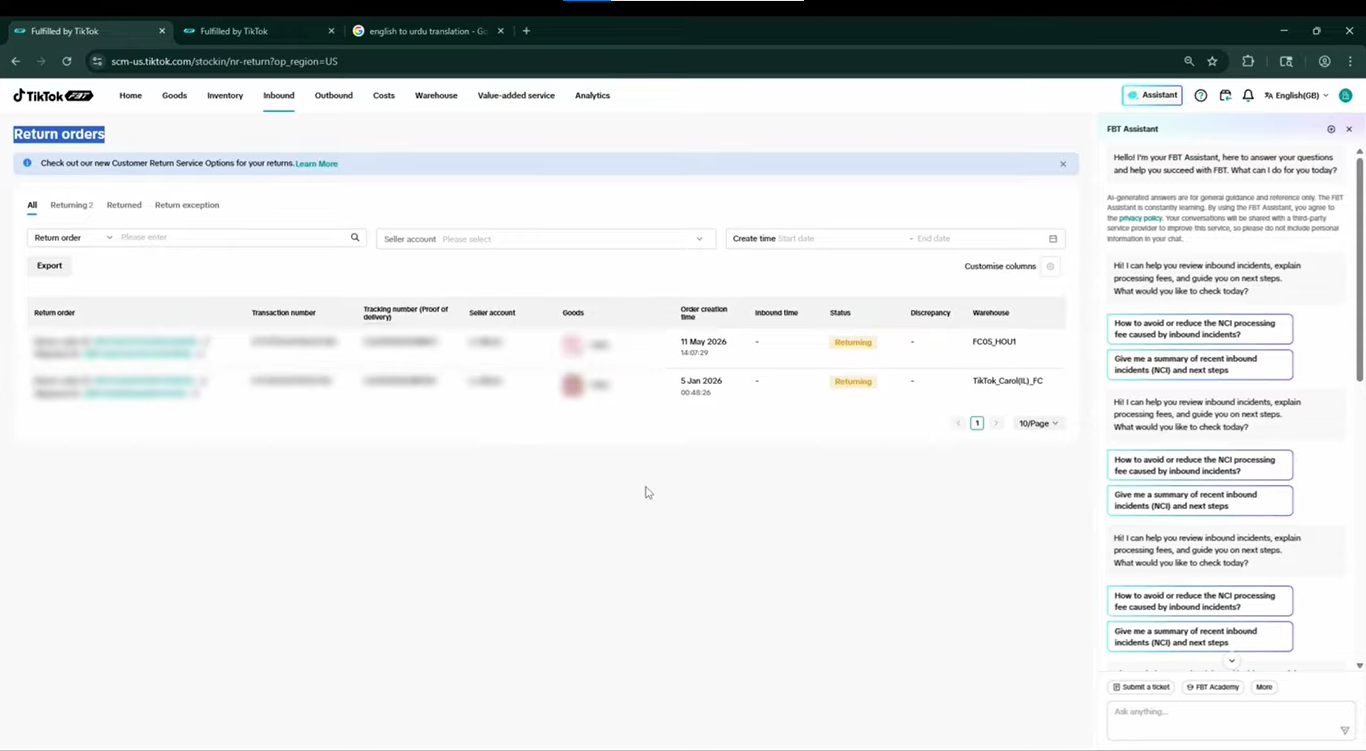
Open the relevant return record and review the available order information.
Depending on the interface, sellers may be able to review the associated order, returned goods, return status, and processing information.
Source: Tiksly
The video demonstrates where these returns appear, but it does not walk through a complete refund approval or return-disposition process.
Those decisions should follow the applicable TikTok Shop return policies and the seller’s FBT return settings.
Step 3: Check the Return Reason and Status
Review the reason for the customer’s return and determine whether any seller action is required.
Depending on the case, return requests may involve:
Products arriving damaged
Incorrect items
Missing products
Customer dissatisfaction
Delivery-related problems
TikTok handles certain FBT-related logistics issues through its customer service and compensation procedures.
For example, TikTok’s U.S. guidance distinguishes between logistics-related cases that may qualify for automatic compensation and situations requiring seller action or additional claims.
Step 4: Review Returned Inventory and Applicable Fees
After a return is processed, sellers should check how the returned inventory is handled.
Depending on the available options and product condition, inventory may be routed for further handling, returned to the seller, or disposed of.
The selected disposition can affect the final costs.
Under the U.S. FBT return rate card effective June 1, 2026, TikTok replaced the previous flat customer return handling fee with itemized per-unit charges. Applicable costs depend on the service and final disposition.
Sellers should review their current FBT return settings and billing records rather than assuming all returns carry the same fee.
FBT Inbound Incidents vs. Customer Returns: What’s the Difference?
Although both processes involve inventory, they address different stages of fulfillment.
Feature | FBT Inbound Incidents | FBT Customer Returns |
|---|---|---|
When it happens | During inbound shipment or receiving | After a customer purchases an FBT-fulfilled order |
Main concern | Shipment compliance and inventory discrepancies | Returned products and customer refund requests |
Common issues | Wrong warehouse, late cartons, missing units | Damaged products, incorrect items, customer returns |
Dashboard section | Inbound Incidents | Return Orders |
Supporting records | Shipment plans, labels, tracking, receiving records | Customer orders, return reasons, return statuses |
Potential costs | Applicable incident or noncompliance fees | Applicable return processing or disposition fees |
Seller priority | Investigate shipment problems and inventory differences | Monitor return processing and customer-related issues |
Understanding this distinction helps sellers investigate the correct issue without confusing inbound inventory problems with post-purchase returns.
How to Prevent TikTok Shop FBT Inbound Incidents
While some shipment problems are unavoidable, careful preparation can reduce preventable errors.
Verify Warehouse Addresses Before Shipping
Always compare the assigned warehouse address with the address printed on shipment labels.
If an inbound plan assigns inventory to multiple destinations, verify that each shipment follows its designated routing instructions.
Match Carton Quantities With Your Inbound Plan
Before dispatching inventory, confirm that the quantities in your inbound request match the physical shipment.
Check SKU quantities, carton counts, and product labels.
Accurate shipment information helps reduce receiving discrepancies.
Follow Delivery Appointment Requirements
For U.S. FBT shipments, truck deliveries generally require advance warehouse appointments, while qualifying small-parcel deliveries do not.
Confirm the applicable booking requirements before arranging transportation.
Monitor Shipment Tracking
Track inbound shipments until they reach the assigned facility.
If delivery estimates change, update the relevant shipment information where required.
Early monitoring may help sellers identify delayed cartons before they create additional complications.
Review Inventory and Incident Reports Regularly
Make it a routine to compare inbound shipment plans with received inventory.
Check new incidents, unresolved discrepancies, and processing fees.
You can also learn about managing TikTok Shop FBT warehouse and cost billing for related inventory-cost management guidance.
How Tiksly Can Help With TikTok Shop FBT Management
Managing FBT inventory requires more than sending products to a warehouse.
Sellers must also monitor shipments, investigate discrepancies, review fulfillment costs, and respond to customer-related issues.
Tiksly offers TikTok Shop management and virtual assistance services designed to support these day-to-day operations.
Through its TikTok Shop Management Services, Tiksly supports order management, supplier coordination, customer communication, returns, and operational reporting.
For sellers dealing with FBT-related operational challenges, our services can support more consistent monitoring and coordination.
While TikTok controls its own warehouse investigations, incident decisions, and reimbursement approvals, experienced operational support can help sellers organize information and follow the appropriate processes.
Conclusion
Handling TikTok Shop FBT inbound incidents and customer returns becomes easier when sellers understand where to find shipment problems, how to interpret discrepancies, and which records to review.
Whether an inbound shipment reaches the wrong warehouse, cartons arrive late, or received quantities do not match the shipment plan, reviewing the incident details is the first step toward resolving the problem.
Regular inventory monitoring and accurate shipment preparation can also help prevent avoidable complications.
Need expert help managing your TikTok Shop? Tiksly provides operational support, virtual assistance, and personalized guidance to help sellers manage fulfillment challenges and improve their daily workflows.
Book a consultation with Tiksly experts to discuss your FBT inventory, shipment issues, and customer return management.
FAQs
1. What Does FBT Mean on TikTok Shop?
FBT stands for Fulfilled by TikTok. It is a fulfillment service through which eligible sellers send inventory to TikTok’s fulfillment network for storage and customer order fulfillment. Sellers remain responsible for meeting applicable inbound shipment requirements and monitoring inventory.
2. Why Is My TikTok Shop FBT Inventory Showing Missing Units?
Missing units may appear when the warehouse records fewer received products than the quantity listed in the inbound plan. Possible causes include short shipments, incomplete receiving, damaged goods, or inventory reconciliation issues. Sellers should investigate the discrepancy before assuming the products are permanently lost.
3. Does TikTok Shop Charge Fees for Inbound Incidents?
Yes. TikTok Shop may charge applicable fees for certain noncompliant inbound shipments, including routing or receiving problems. The amount depends on the incident type and current fee structure. Sellers should review the incident record and applicable FBT rate card to confirm the charge.
4. How Do I Check Customer Returns on TikTok Shop FBT?
Open the FBT management interface and locate the Return Orders section. Review the available return records to identify customer returns associated with FBT-fulfilled orders. For refund decisions and customer requests, also check the relevant returns and refunds information in Seller Center.
5. Can I Request Reimbursement for Missing FBT Inventory?
Yes, eligible inventory losses or damage may qualify for reimbursement under TikTok’s policies. Sellers should first investigate the discrepancy, verify shipment and receiving records, and gather supporting documentation. Reimbursement is subject to TikTok’s eligibility requirements and review process.