 Ayesha Khan
TikTok Shop violations can affect your account health, restrict selling privileges, and put your store at risk of suspension. If you have received a violation or warning, your first step should be to check the reason, understand the enforcement action, and find out whether TikTok allows you to appeal or correct the issue.
You can address eligible TikTok Shop violations through the Seller Center by submitting an appeal, correcting the underlying issue, or completing an available policy quiz. However, you cannot manually delete violation records or guarantee their removal. TikTok Shop reviews appeals and decides whether to reverse an enforcement action.
This guide explains how to check violation records, understand their statuses, appeal eligible violations, review warning records, and monitor your shop’s account health. It also includes a step-by-step Seller Center walkthrough to help you understand where to find each option.
| Quick AnswerTo address TikTok Shop violation records, open Seller Center, go to Shop Health > Violation Records, and select the violation you want to review. Check its reason, enforcement status, and available actions. If the violation is incorrect and an appeal option is available, submit relevant evidence before the deadline. For eligible issues, correct the problem or complete an available policy quiz. Successful appeals can reverse enforcement actions and remove associated violation points. |
Understanding TikTok Shop Violation Records and Warning Records
Before trying to clear a violation, you need to understand the difference between violation records and warning records.
Both appear in your shop’s account health area, but they serve different purposes.
What Are TikTok Shop Violation Records?
TikTok Shop violation records contain details of policy breaches or enforcement actions associated with your seller account.
When TikTok identifies a potential policy violation, it creates a record explaining the issue and any action taken against your shop.
Depending on the violation, the enforcement may include:
- Violation points or deductions from your account health.
- Product removal or listing restrictions.
- Product or shop selling restrictions.
- Formal warnings.
- Temporary suspension of certain selling privileges.
- Account suspension or deactivation for serious violations.
For example, a product listing with misleading pricing or promotional information may trigger an enforcement action. TikTok records the violation and provides information about the affected product, the reason for enforcement, and any available next steps.
What Are TikTok Shop Warning Records?
Warning records show notices TikTok Shop issues when it identifies potential policy or compliance problems.
A warning may alert you to an issue before further enforcement takes place. However, the presence of a warning does not automatically mean that your shop has received violation points.
You should still review every warning carefully. Some warnings may require corrective action, while others may simply provide information about a policy issue.
Important: A warning, a violation record, and an enforcement action are not interchangeable. Always check the specific notice to understand whether TikTok has applied a penalty or given you an opportunity to correct the issue.
How to Find TikTok Shop Violation Records in Seller Center
TikTok Shop provides a dedicated section where sellers can review their violation history and investigate enforcement decisions.
Follow these steps to access your records.
Step 1: Log In to TikTok Shop Seller Center
Open TikTok Shop Seller Center and sign in using the seller account associated with your store.
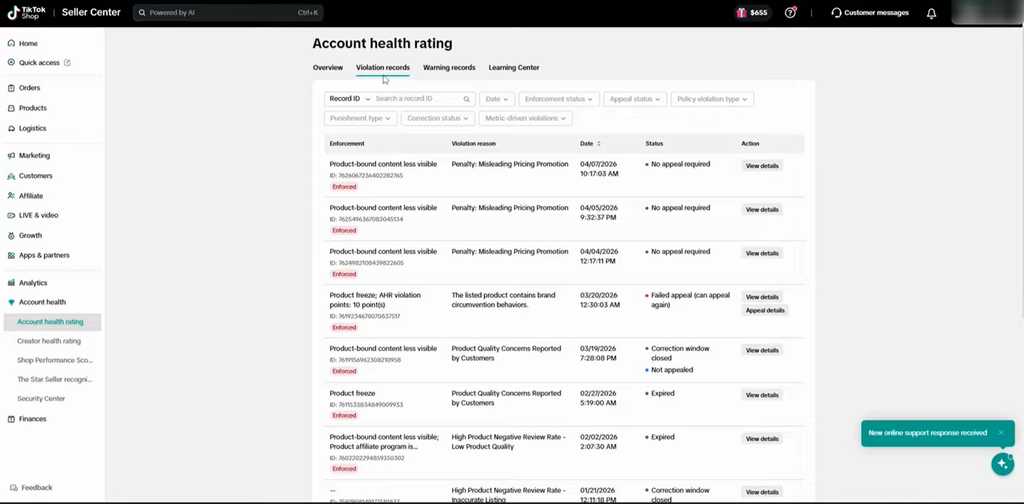
Navigate to the Shop Health or Account Health section. The exact navigation label may differ depending on your marketplace and Seller Center version.
Source: Tiksly
Step 2: Open the Violation Records Section
Select the Violation Records tab to view the violations associated with your shop.
This section provides a record of enforcement actions and allows you to investigate individual cases.
You can use the available filters to locate a particular violation instead of searching through your entire history.
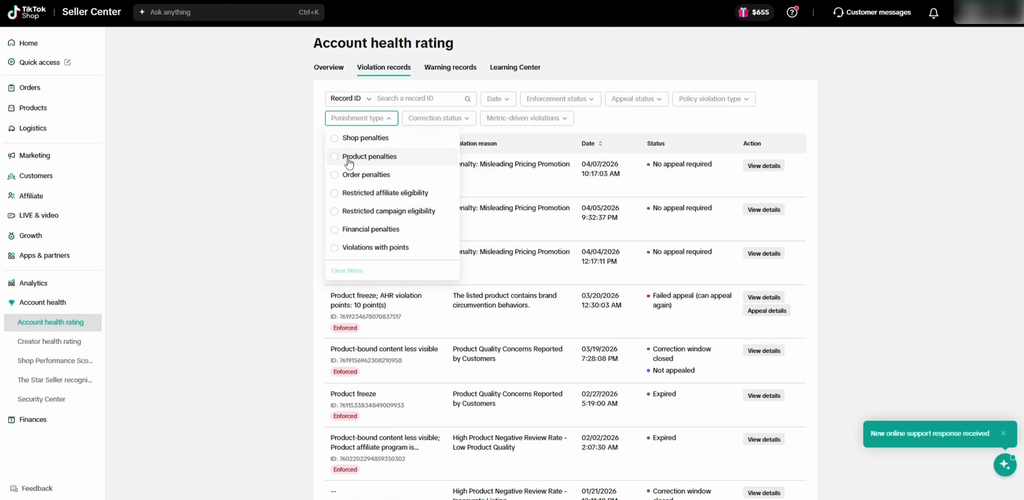
Step 3: Use Filters to Find a Specific Violation
TikTok Shop provides several filtering options to help sellers locate relevant records.
Depending on the interface, you may be able to filter records using:
- Violation ID: Search for a particular enforcement record.
- Product ID: Find violations associated with a specific product.
- Order ID: Locate violations connected to an order.
- Enforcement status: Filter records based on whether enforcement is pending or has already been applied.
- Appeal status: Review violations based on their appeal progress or outcome.
- Policy violation type: Narrow records by the policy category involved.
- Punishment type: Identify records associated with penalties or violation points.
These filters make it easier to identify repeated problems, investigate individual enforcement actions, and prioritize violations that require attention.
Source: Tiksly
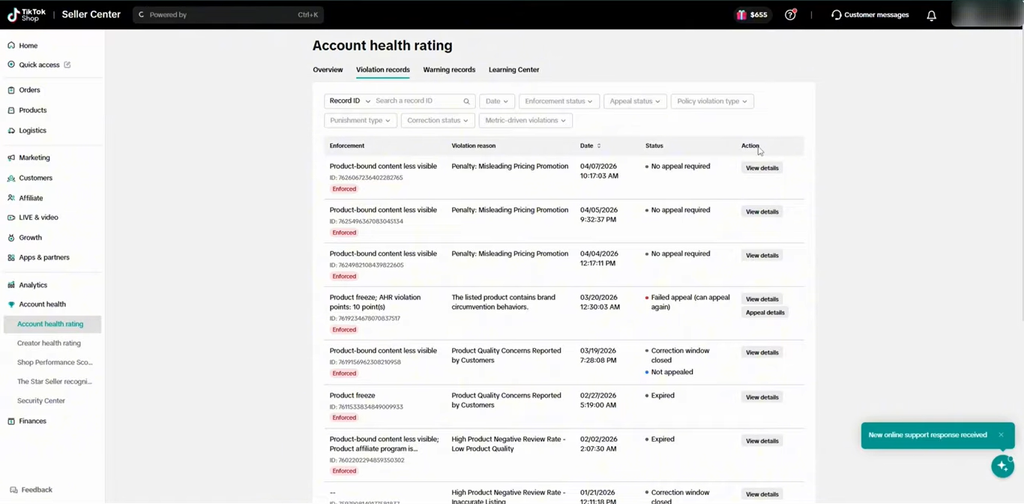
Step 4: Review the Violation Details
Once you locate a violation, open its details to understand why TikTok Shop issued the enforcement action.
The record may display:
- Enforcement action.
- Violation reason.
- Violation date.
- Current status.
- Affected product or order.
- Policy category.
- Available corrective actions.
- Appeal eligibility.
- Compliance guidance.
Read the complete notice before taking action. The reason shown in the record should guide your investigation and determine what evidence you need.
For example, if TikTok flags a product for misleading pricing or promotional information, review the product’s pricing, discounts, promotional claims, and listing details.
Source: Tiksly
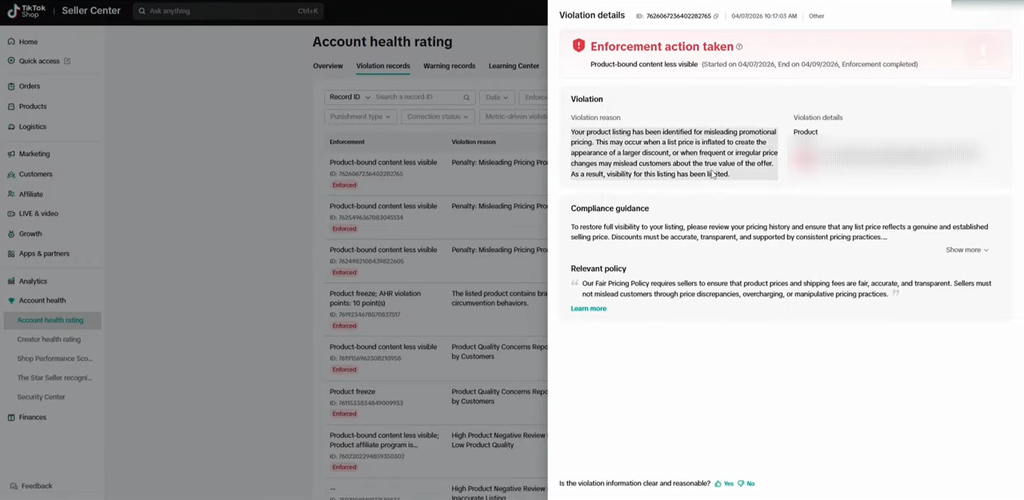
How to Understand TikTok Shop Violation Statuses
Every violation record has a status that helps you understand what has happened and what you can do next.
Knowing these statuses prevents you from wasting time on actions that are no longer available.
Pending Enforcement
A pending status means the enforcement action has not yet taken effect.
Depending on the violation, TikTok Shop may allow you to submit an appeal or correct the issue before the enforcement deadline.
Check the violation notice for the available options and act within the stated timeframe.
Enforcement Action Taken
This status means TikTok has already applied the enforcement action.
Depending on the case, this may involve violation points, product restrictions, or other penalties.
If you believe the decision is incorrect, check whether the record still provides an appeal option.
Appeal Pending
An appeal pending status means TikTok Shop has received your appeal and is reviewing your submission.
You should monitor the appeal details for updates and avoid submitting unrelated or duplicate evidence.
Appeal Successful
A successful appeal means TikTok has accepted your case and reversed the relevant enforcement decision.
Depending on the case, associated violation points may be removed and withdrawn privileges restored.
Appeal Failed
An unsuccessful appeal means TikTok has not accepted your explanation or supporting evidence.
Check the decision details to understand why the appeal was rejected. If a second appeal is available, review the original submission carefully and prepare additional relevant evidence.
No Appeal Required or Appeal Unavailable
Some records may show that no appeal is required or that the appeal option is unavailable.
This can happen when a warning does not require an appeal, when the appeal period has expired, or when TikTok does not provide an appeal option for that particular case.
Check the enforcement details and follow any corrective guidance provided by TikTok.
Source: Tiksly
How to Appeal TikTok Shop Violation Records
If you believe TikTok Shop has issued a violation incorrectly, you may be able to challenge the decision through its appeal process.
An appeal gives you an opportunity to explain why the enforcement action should be reconsidered and provide evidence supporting your position.
Step 1: Open the Violation You Want to Appeal
Go to Seller Center and navigate to:
Shop Health > Violation Records > View & Appeal > Appeal
Select the relevant violation and review its details.
The appeal option appears only when TikTok allows an appeal for that particular record.
Step 2: Identify the Reason for the Violation
Before submitting an appeal, understand exactly which policy TikTok believes you have violated.
For example:
- Misleading product pricing.
- Incorrect promotional claims.
- Product listing policy violations.
- Intellectual property concerns.
- Product authenticity issues.
- Shipping or fulfillment problems.
Your appeal should address the specific reason stated in the violation notice.
Step 3: Collect Supporting Evidence
A strong appeal needs relevant documentation that directly addresses the issue.
Depending on the violation, you may need:
| Violation type | Possible supporting evidence |
| Misleading pricing | Product pricing screenshots and promotion details |
| Intellectual property | Brand authorization letters and trademark documents |
| Product authenticity | Supplier invoices and purchase records |
| Incorrect product information | Product specifications, images, and listing screenshots |
| Shipping violations | Tracking records, carrier confirmations, and dispatch records |
| Order-related issues | Order details and relevant customer communication |
Only submit genuine documents that relate to the specific violation.
Step 4: Write a Clear Appeal Explanation
Your appeal should explain what happened, why you believe the enforcement decision was incorrect, and how your evidence supports your position.
Avoid emotional language, vague statements, or unsupported claims.
You can use this general structure:
Appeal explanation template:
“We are requesting a review of violation ID [Violation ID] because we believe the enforcement action was issued incorrectly. The violation concerns [specific policy reason]. We have reviewed the relevant product, order, or business records and attached supporting documentation to clarify the issue. Please review the submitted evidence and reconsider the enforcement decision.”
Customize the explanation to your actual circumstances. Never claim that a violation is incorrect if the evidence does not support your position.
Step 5: Submit Your Appeal and Monitor Its Status
Review your explanation and attachments before submitting the appeal.
Once submitted, return to the violation record or appeal details section to monitor its progress.
TikTok Shop’s US seller guidance provides the following appeal windows:
- First appeal: Within 30 calendar days of the violation notification.
- Second appeal: Within 15 calendar days after the first appeal decision, if the first appeal is unsuccessful and a second appeal is available.
The number of appeals and deadlines can differ by marketplace or violation type. Always follow the deadline displayed in your own Seller Center notice.
If TikTok accepts your appeal, the associated enforcement action may be reversed, and relevant violation points may be restored.
If the appeal is rejected, the original enforcement remains in place unless another permitted review option is available.
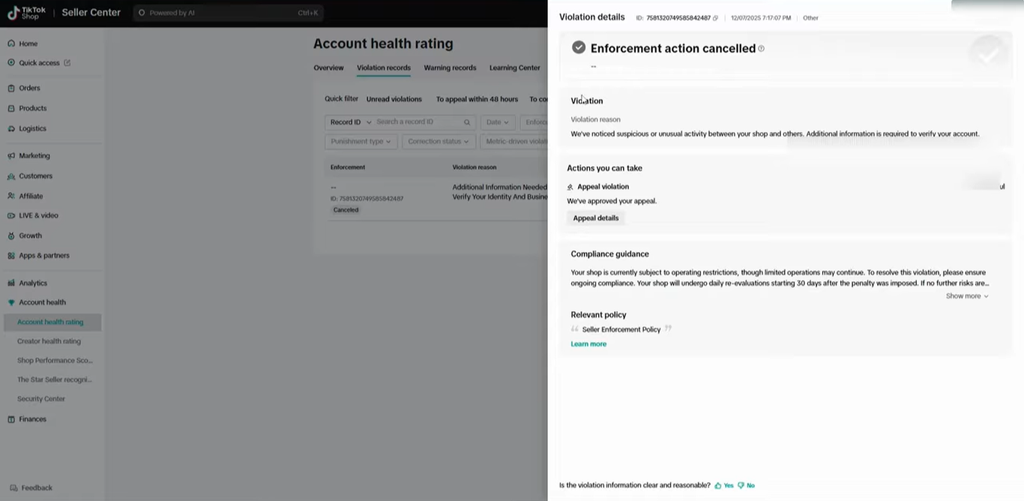
How to Check Expired and Successfully Appealed Violations
Your violation history can contain different types of records, including expired violations, unsuccessful appeals, and successfully appealed cases.
Reviewing these records helps you understand your account’s history and distinguish active penalties from resolved cases.
Successfully Appealed Violations
These are violations for which TikTok has accepted your appeal.
A successful appeal can reverse the associated enforcement action and remove relevant violation points.
Review the appeal details to confirm the decision and check whether the account health information has been updated.
Expired Violations
Some violation points automatically expire after a specified period, depending on the marketplace and applicable policy.
For example, certain seller policies provide a 180-calendar-day violation point reset period. Other marketplaces may follow different timelines.
An expired violation point does not necessarily mean the historical record disappears from your Seller Center.
Failed Appeals
If TikTok rejects an appeal, the enforcement action generally remains in place.
Review the decision, identify any missing evidence, and check whether another appeal is permitted before its deadline.
Source: Tiksly
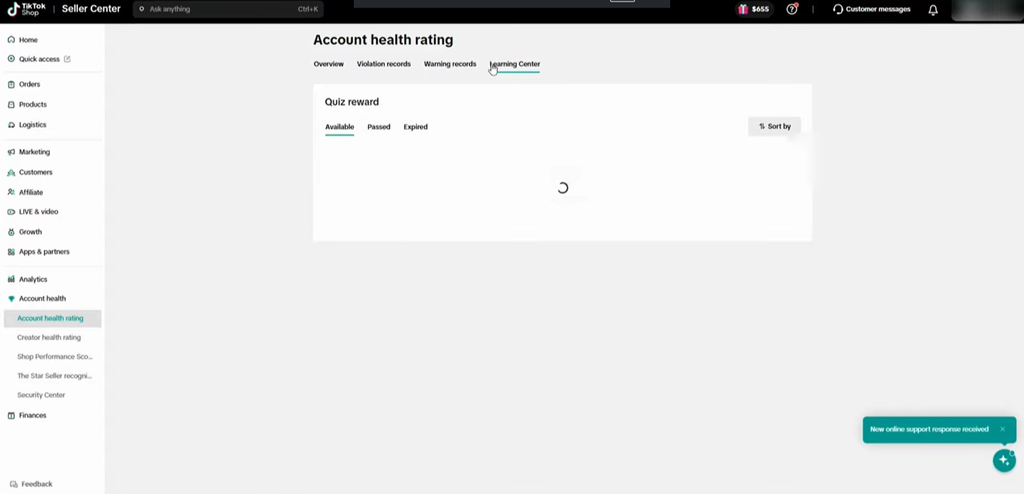
How to Check TikTok Shop Warning Records
Apart from formal violation records, TikTok Shop provides a warning records section where sellers can review notices related to potential compliance issues.
These warnings can help you identify problems before they develop into more serious enforcement actions.
Follow these steps to review your warning history.
Step 1: Open the Warning Records Section
Navigate to the account health area of Seller Center and locate Warning Records.
The section displays warning information associated with your shop.
Step 2: Review Warning Details
Depending on the available interface, you can review:
- Warning reasons.
- Warning types.
- Warning status.
- Related actions.
- Relevant dates and details.
Read each warning carefully to understand which policy or business activity requires attention.
Step 3: Check Whether Corrective Action Is Needed
Some warnings may provide guidance without applying an immediate penalty.
Others may indicate that you need to correct a particular issue.
For example, if a warning concerns promotional content, review your product claims and promotional information. If it relates to product listings, check the affected product’s images, description, and other details.
Do not ignore a warning simply because it has not resulted in violation points.
Source: Tiksly
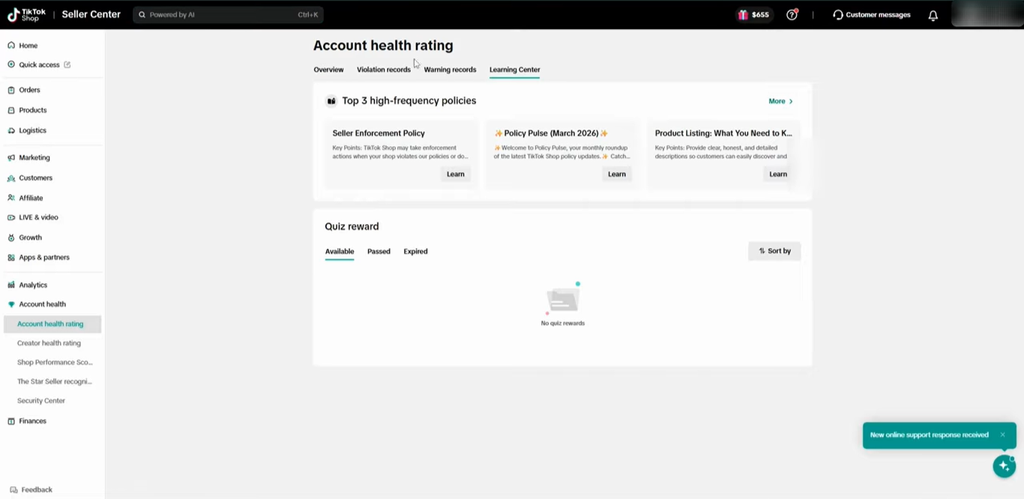
How to Use TikTok Shop Policy Quizzes to Improve Account Health
TikTok Shop may provide policy quizzes to help sellers understand its rules and improve compliance.
Depending on the marketplace and the quiz available, successfully completing a quiz may help you earn back points or reduce the duration of certain enforcement actions.
Step 1: Open the Available Quiz Section
Go to the account health area and look for the policy quiz or available quiz section.
You may see different categories, including:
- Available quizzes.
- In-progress quizzes.
- Expired quizzes.
- Completed quizzes.
The available options depend on your account and marketplace.
Step 2: Select the Relevant Quiz
Choose a quiz related to the policy issue affecting your shop.
Read the instructions carefully before answering the questions.
Step 3: Complete the Quiz
Answer the questions based on TikTok Shop’s policies and compliance requirements.
Some quizzes require a passing score to provide the associated benefit.
Step 4: Check Your Results
After completing the quiz, review the result and check your account health dashboard for any changes.
Remember that quizzes do not automatically erase every violation record. Their benefits depend on the specific quiz and enforcement program.
Source: Tiksly
Why Do TikTok Shop Violations Keep Returning?
Removing or resolving an existing violation does not guarantee that your shop will remain free of future enforcement actions.
Repeated violations often indicate that an underlying compliance problem has not been addressed.
Here are some common reasons sellers continue receiving violations.
Incorrect Product Listings
Product titles, descriptions, images, and specifications must accurately represent the products being sold.
Misleading information or unsupported claims can trigger additional enforcement actions.
Misleading Promotions and Pricing
Discounts, promotional claims, and displayed prices should accurately reflect the actual offer.
Check your promotional settings and product pricing whenever TikTok flags a listing for misleading information.
Intellectual Property Problems
Selling branded products without the required authorization or using protected images, logos, or trademarks without permission can create serious compliance risks.
Keep supplier invoices, brand authorization letters, and relevant intellectual property documents organized.
Shipping and Fulfillment Problems
Late dispatches, invalid tracking information, and seller-fault cancellations can affect your shop’s performance and account health.
Review your fulfillment process regularly and ensure that orders are processed within the required timelines.
Repeated Policy Violations
Receiving the same violation multiple times can lead to stronger enforcement.
Review previous violation records to identify patterns and make changes before similar issues occur again.
Best Practices to Keep Your TikTok Shop Account Healthy
After addressing existing violations, focus on preventing similar problems from happening again.
Use these practices to maintain better account health.
- Review your violation records regularly. Check for new violations, warnings, and approaching appeal deadlines.
- Read TikTok Shop policies. Review the latest product listing, promotional, intellectual property, and fulfillment requirements for your marketplace.
- Keep supporting documents organized. Maintain supplier invoices, authorization letters, product specifications, and shipping records.
- Check product listings before publishing. Verify that product descriptions, images, pricing, and promotional claims are accurate.
- Monitor shipping performance. Track dispatch times, delivery updates, cancellations, and customer complaints.
- Train your team. Make sure everyone handling listings, promotions, orders, and customer communication understands the relevant policies.
- Act quickly when warnings appear. Investigate the issue before it develops into a formal enforcement action.
- Monitor account health changes. Review your account health rating and investigate unexpected point deductions.
You can also read Tiksly’s detailed guide on protecting your TikTok Shop from suspensions and policy violations for additional compliance guidance.
How Tiksly Can Help You Resolve TikTok Shop Violations
Managing multiple TikTok Shop violations, rejected appeals, and account restrictions can be challenging. Tiksly helps sellers review violation records, identify potential appeal opportunities, prepare appeals with relevant evidence, and address product listing and policy compliance issues. The experts also recommend corrective actions and prevention strategies to improve account health and reduce the risk of repeated violations.
Explore Tiksly’s TikTok Shop Violation Removal Services to learn how Tiksly can support your shop.
Conclusion
Clearing TikTok Shop violations starts with understanding enforcement reasons, appealing eligible decisions, and correcting compliance issues. Regularly monitor your violation and warning records to protect your account health and prevent repeated penalties.
If your shop is facing multiple violations or account restrictions, Tiksly experts can help you assess the issues and prepare an effective recovery strategy. Book a one-to-one TikTok Shop consultation to discuss your account and take the next steps toward better shop health.
FAQs
1. How do I remove violation records from my TikTok Shop?
You cannot manually delete violation records from TikTok Shop. If you believe an enforcement action is incorrect, you can appeal through Seller Center when the option is available. A successful appeal may reverse the enforcement action and remove associated violation points. Some violation points may also expire according to your marketplace’s applicable policy.
2. How long do TikTok Shop violation points last?
The expiration period depends on your marketplace and the applicable seller policy. For example, certain TikTok Shop seller policies use a 180-calendar-day violation point reset period, while other markets may have different timelines. Check your Seller Center for the rules that apply to your shop.
3. How many times can I appeal a TikTok Shop violation?
In the US seller appeal process, sellers can generally submit up to two appeals for an individual violation. The first appeal must be submitted within 30 calendar days of the notification, while a second appeal, if available, must be submitted within 15 calendar days after the first decision. Other marketplaces and violation types may have different requirements.
4. Can I remove TikTok Shop warning records?
You cannot manually delete warning records. Some warnings may remain in your account history even after you address the underlying issue. Review the warning details and follow any corrective guidance provided by TikTok Shop.
5. What happens if my TikTok Shop appeal is rejected?
If TikTok Shop rejects your appeal, the original enforcement action generally remains in place. Review the rejection reason, check whether a second appeal is available, and prepare additional relevant evidence if permitted. If no further appeal is available, address the underlying compliance issue to avoid repeated violations.