 Ayesha Khan
Running a TikTok Shop can be highly rewarding, but it comes with its challenges. One of the most common frustrations sellers face is dealing with lost or damaged packages. Even if you meticulously package items and ship them on time, logistics mishaps can occur, causing refunds or lost revenue.With TikTok Shop’s global gross merchandise value expected to reach around $66 billion in 2025 and continuing strong growth beyond, the volume of shipments increases the likelihood of logistics challenges that sellers must navigate carefully.
For over 500,000 registered sellers in the United States alone, understanding the reimbursement process is essential for safeguarding your business. A strong grasp of how reimbursements work ensures you can recover your losses efficiently and maintain a healthy cash flow.
What Is a TikTok Shop Reimbursement?
A reimbursement is a compensatory payment made to the seller to cover a lost payout due to shipping issues or platform-initiated refunds. It differs from a refund, which takes money directly from your seller balance to return to the buyer.
- Refund: Money goes back to the buyer, directly reducing your seller balance.
- Reimbursement: Money is paid to you to cover losses caused by logistics errors or unfair refunds.
Consider reimbursements as a safety net. If managing claims feels time-consuming, TikTok Shop Reimbursement Service helps sellers handle documentation, follow-ups, and appeals so valid claims are processed correctly and paid faster.
While TikTok prioritizes buyer satisfaction to maintain high conversion rates (currently averaging 8–12%), reimbursements prevent merchants from bearing the cost of carrier mistakes or automated platform refunds.
When TikTok Shop Offers Reimbursement
TikTok Shop provides reimbursements primarily in scenarios where the seller or platform is not at fault. Understanding these scenarios can help you quickly identify when a claim is applicable.
Logistics-Related Issues
Reimbursements apply only to TikTok Shipping orders. If you are using Seller Shipping, TikTok cannot intervene, and you must work directly with your carrier.
Typical logistics issues include:
- Lost Packages: If the carrier confirms the package is lost or tracking shows no update for a prolonged period.
- Damaged Packages: Items broken during transit due to mishandling by the carrier.
- Delivered-Not-Received (DNR): Tracking shows delivered, but the buyer claims they did not receive the item.
Many sellers reduce lost, damaged, and delayed orders by working with TikTok Shop 3PL Fulfillment Services, which improve handling accuracy, tracking reliability, and carrier coordination.
Warehouse or Fulfillment Errors
For sellers using Fulfilled by TikTok (FBT), TikTok assumes full responsibility for mistakes inside the warehouse. This includes:
- Wrong Items Shipped: When fulfillment center staff send the incorrect product.
- Missing Items: Multi-item orders where one or more products are missing.
Platform-Approved Refund Scenarios
In certain cases, TikTok auto-approves refunds, but sellers can appeal for reimbursement. Examples include:
- Low-Value Refunds: Items priced under $10 (or $100 for non-electronic items) may be refunded without requiring a return.
- Delayed Delivery: Orders not delivered within six days of the Estimated Delivery Time (EDT).
Situations Where Reimbursement Is Not Provided
TikTok will reject reimbursement requests if the seller is at fault. Common reasons include:
- Weak or improper packaging that leads to damage.
- Late shipment causing auto-cancellation or refund.
- Product defects or mismatch with the description.
- Policy violations, such as selling prohibited or counterfeit items.
- Insufficient or fake proof, like blurry photos or altered tracking screenshots.
Understanding these rules can prevent wasted time and effort filing claims that are destined to be rejected.
TikTok Shop Reimbursement Policy Basics
The reimbursement framework is built on evidence and timelines. Being aware of the rules helps you act quickly and increase approval chances.
- Time Limits: Claims must be filed within 90 days of shipment for insurance issues.
- Decision Makers: TikTok internal teams or U-PIC, the third-party insurer, handle approvals.
- Seller Performance Score (SPS): Maintaining a high SPS (4.0 or above) may qualify you for “Premium Subsidies,” covering more of return costs.
Step-by-Step TikTok Shop Reimbursement Process
Here’s a detailed guide to successfully filing a reimbursement claim.
Step 1: Identify the Order Issue
Start by reviewing your orders in Seller Center. Confirm the refund reason, check tracking updates, and note whether the package is lost, damaged, or marked as Delivered-Not-Received (DNR).
Even if tracking shows “In Transit,” if the carrier confirms a loss, the order may be eligible for a claim. Clear identification of the problem sets the stage for a smooth process.
Step 2: Collect Required Evidence
Missing or poor-quality evidence is the main reason claims are rejected. Prepare the following:
- Shipping Labels: Save all labels; they are essential for claim verification.
- Tracking Screenshots: Include documentation of the last carrier update.
- Carrier Confirmation: Emails or messages acknowledging the loss or damage.
- Customer Communication: Screenshots of discussions regarding the order issue.
Using high-quality, date-stamped images and continuous packing/unboxing videos can significantly improve claim approval rates.
Step 3: Submit a Reimbursement Request
All insurance claims are handled through U-PIC, TikTok’s third-party insurance partner.
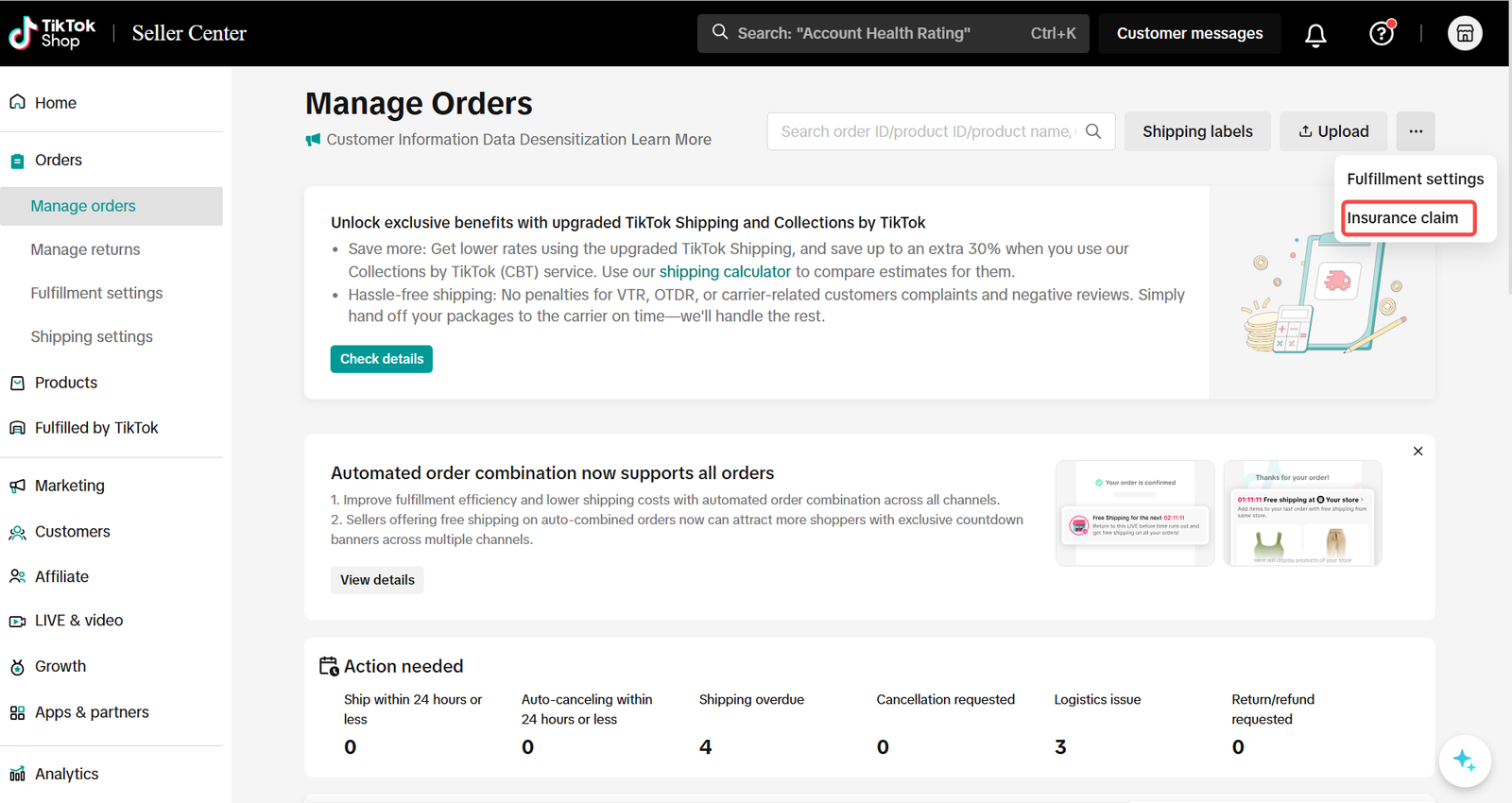
You can start your claim from either of these locations in Seller Center:
- Manage Orders list view.
Source: TikTok Shop
- Order Details page.
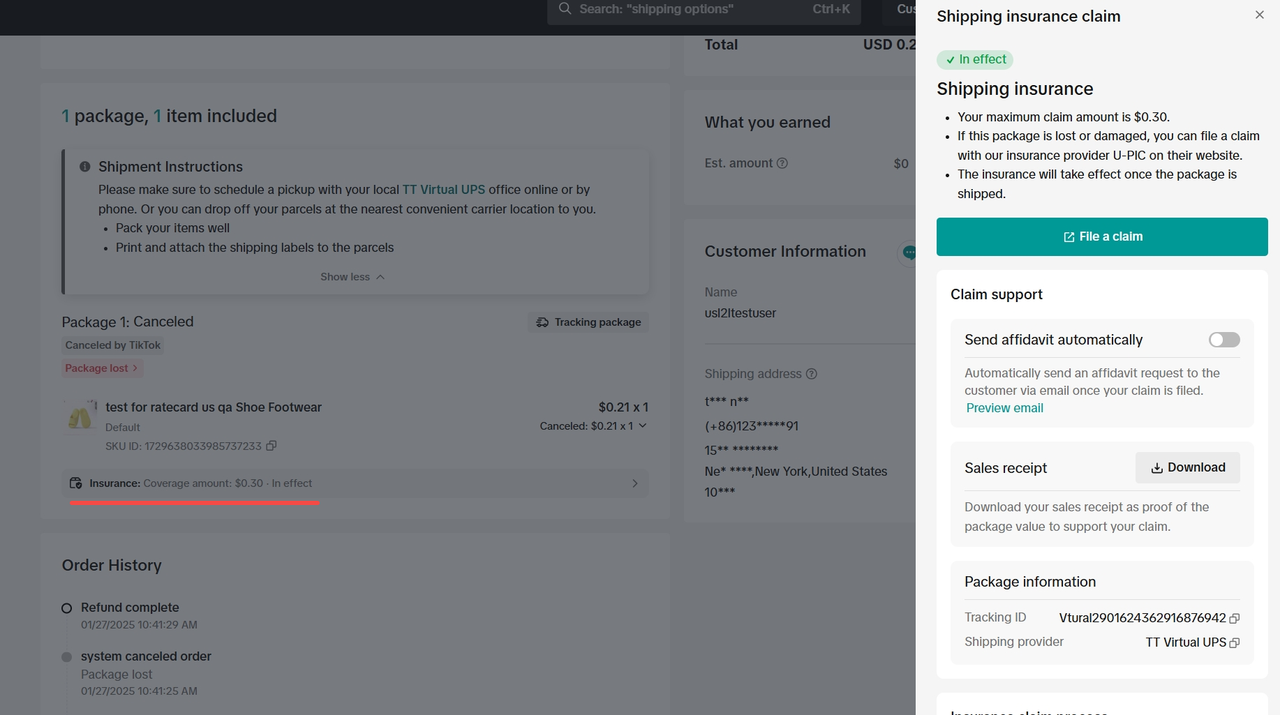
Source: TikTok Shop
Click File a Claim and answer eligibility questions. If your order qualifies, you will be redirected to U-PIC’s platform to submit your documentation. If the order isn’t eligible yet, you’ll receive a message explaining why along with U-PIC contact information.
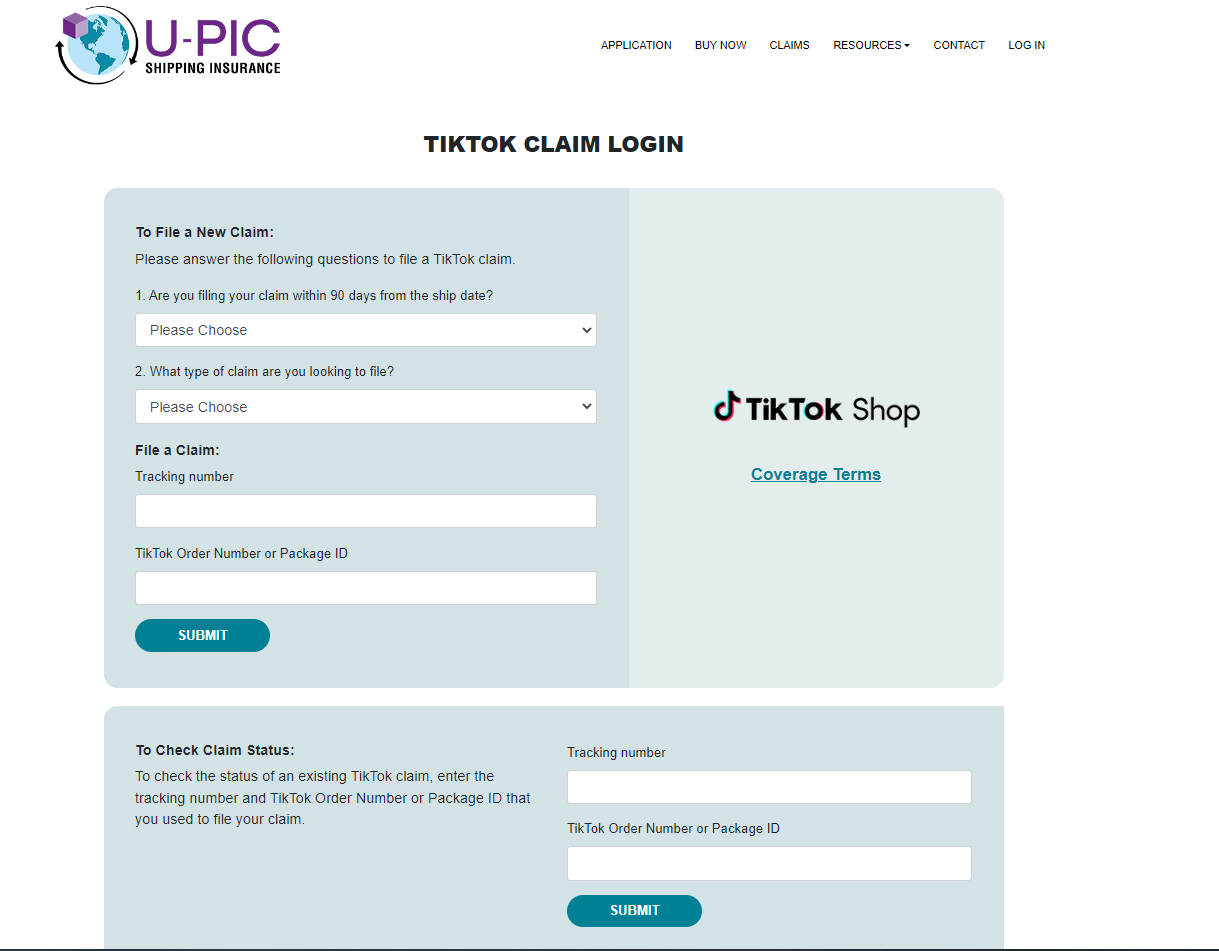
Source: TikTok Shop
Step 4: Fill up the claim details on UPIC website
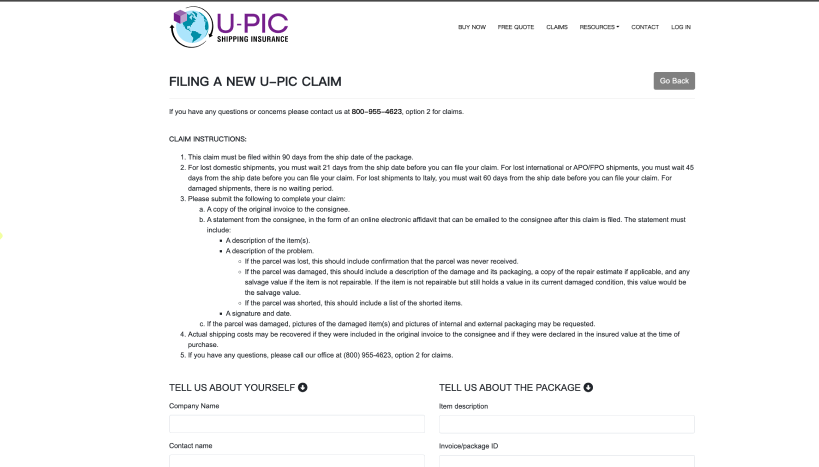
Source: TikTok Shop
Step 5: TikTok Shop Review Process
Once submitted, your claim enters the review stage:
- Manual vs. Automated: Standard FBT claims are often automated, while Seller Fulfilled (SFS) claims require manual verification.
- Timeframe: Typically, a decision is made within 7–10 business days after receiving a complete claim.
The review team evaluates all submitted evidence, verifies carrier confirmation, and determines reimbursement eligibility.
Step 6: Approval or Rejection Outcome
After review, the outcome is displayed in the Compensation tab in Seller Center.
- Approval: You will see the amount approved and the next steps for payment.
- Rejection: TikTok or U-PIC provides a reason, and you can appeal if you believe the claim was unfairly denied.
Reimbursement Timeline and Payment Method
After approval, payouts follow a clear process:
- Approval Time: Insurance claims: 7–10 business days; standard logistics tickets: approximately 5 business days.
- Payment Method: Direct transfer via check or bank transfer from U-PIC.
- Wallet Impact: Insurance payouts do not appear in Seller Center Settlements.
This ensures clarity for sellers regarding when they can expect to recover their losses.
How Much Does TikTok Shop Reimburse?
Reimbursement aims to make you financially whole by covering the full transaction value:
Reimbursement = Product Price + Buyer-paid Shipping + Coupon Value − Refund Admin Fee
- TikTok Shipping orders are automatically insured up to $200 at no cost.
- For items valued over $200, additional insurance (up to $5,000) must be purchased during label creation. Otherwise, the payout is capped at $200.
Common Reasons Claims Are Rejected
Even experienced sellers can face rejection if they overlook details. Common reasons include:
- Late submission beyond the 90-day window.
- Wrong claim category (e.g., product quality filed as logistics loss).
- Unclear or incomplete evidence.
- Absence of acceptance scan from the carrier.
- Seller errors like late shipping or poor packaging.
Tips to Improve Approval Rates
- Always use TikTok Shipping, which provides higher claim success rates.
- Obtain handover proof, such as receipts or scanned packages during pickup.
- Provide high-quality evidence, including date-stamped photos or unboxing videos.
- Respond to buyer disputes within 48 hours to prevent auto-approved refunds that are harder to claim.
For sellers who want fewer disputes and stronger compliance overall, TikTok Shop Management Services support daily operations, order handling, and performance monitoring to reduce reimbursement risks.
FBT vs SFS Reimbursements
- FBT Orders: TikTok handles warehouse errors, often automatically reimbursing lost or damaged items. These claims do not affect your performance metrics.
- SFS Orders: You are responsible for providing evidence and filing claims. These can temporarily impact your metrics until the appeal is resolved.
Reimbursement vs Refund vs Chargeback
It’s important to know the difference:
- Refund: Seller-funded return of money to the buyer.
- Reimbursement: Payment to the seller from TikTok or U-PIC for eligible issues.
- Chargeback: Bank dispute filed by the buyer; involves a $10 representation fee and may take up to 90 days.
If TikTok Shop Rejects Your Claim
- Review the reason in the Appeal Details section.
- Contact U-PIC customer service directly for insurance cases.
- Resubmit with missing evidence, improved photos, or acceptance scans to increase approval chances.
Final Tips for TikTok Shop Sellers
- Record packing videos for high-value orders.
- Ensure every package receives an acceptance scan from the carrier.
- Use rigid boxes and label fragile items appropriately.
- Regularly review policies and updates to stay compliant with 2025–2026 standards.
Quick Reimbursement Checklist for TikTok Shop Sellers
When to file
- File a claim once the carrier confirms a package is lost or damaged.
- Submit Delivered-Not-Received (DNR) claims after tracking shows delivery but the buyer reports non-receipt.
- Ensure all claims are filed within 90 days of shipment to remain eligible.
What you need
- Shipping label and order ID.
- Clear tracking screenshots showing the latest carrier status.
- Carrier confirmation for loss or damage.
- Buyer communication screenshots related to the issue.
- High-quality, date-stamped photos or packing videos for added proof.
How long it takes
- Claim review usually takes 7–10 business days after submission.
- Approved insurance payouts are issued directly by U-PIC via check or bank transfer.
- Standard logistics reimbursements may be completed within 5 business days after approval.
Conclusion
The TikTok Shop reimbursement process is a critical tool for protecting your business from shipping mishaps. By maintaining accurate documentation, understanding the differences between U-PIC insurance and standard claims, and acting quickly, you can safeguard your profits. Organize your orders, ship on time, and manage claims professionally to build a resilient TikTok Shop business.
If you want expert guidance on reimbursements, fulfillment, or claim handling, book a free 1:1 consultation with Tiksly experts to review your store setup and recover lost revenue more efficiently.
FAQs
How long do reimbursements take?
Typically 7–10 business days for both decision and payout.
Can sellers track reimbursement status?
Yes, via the Compensation tab in Manage Returns.
Does reimbursement affect store ratings?
A successful claim removes negative impact on your Seller-Fault Return Rate (SFRR).
Can international sellers request reimbursement?
Yes. Payouts for cross-border sellers are usually auto-withdrawn every Wednesday to linked accounts.