 Ayesha Khan
TikTok LIVE gives sellers an opportunity to showcase products, answer customer questions, and encourage purchases through real-time interactions. When connected with TikTok Shop, livestreaming becomes a shopping experience where viewers can discover products, explore offers, and place orders while watching a broadcast.
For sellers, this creates another way to introduce products, demonstrate their features, and build relationships with potential customers. TikTok Shop also provides tools such as product pinning, LIVE coupons, giveaways, flash sales, and performance analytics to support livestream selling.
In this guide, we’ll explain how TikTok LIVE and TikTok Shop work together, how to prepare for a shopping livestream, which tools sellers can use, and how to evaluate LIVE performance. We’ll also walk through the process using screenshots from our TikTok Shop LIVE selling tutorial.
What Is TikTok LIVE Shopping?
TikTok LIVE Shopping allows sellers and eligible creators to promote products during a livestream and give viewers access to shoppable product links.
Instead of watching a recorded product demonstration, viewers can interact with the host in real time. They can ask questions, request product demonstrations, check available offers, and explore the products added to the livestream.
The shopping experience connects three important activities:
- Product discovery: Viewers discover products through a livestream.
- Customer interaction: Hosts answer questions and demonstrate product features in real time.
- Purchasing: Viewers can access the linked products and complete their purchases through TikTok Shop.
For example, a beauty brand can host a LIVE session to demonstrate its skincare products. The host can explain how each product works, answer questions about its ingredients, pin the relevant product, and highlight an eligible discount.
This helps shoppers make more informed purchasing decisions while giving sellers another opportunity to generate sales.
How TikTok LIVE and TikTok Shop Work Together
TikTok LIVE and TikTok Shop work together by connecting livestream content with product listings and shopping features.
A seller can select products from their TikTok Shop, add them to a LIVE shopping session, and introduce them to viewers during the broadcast. As the host discusses each item, the relevant product can be pinned so viewers can access its shopping details.
Sellers can also use promotional tools to encourage purchases and monitor performance after the session.
Here is how the process works:
1. Connect Your TikTok Account With TikTok Shop
The first step is to ensure that your TikTok account is properly connected to your TikTok Shop and that you have access to the relevant LIVE shopping features.
Your account and shop must meet TikTok’s eligibility requirements for the applicable seller market. Feature availability can vary by region and account type.
Once your account is ready, you can access the available LIVE shopping tools through TikTok’s Creator Center or LIVE Manager.
2. Select Products for Your LIVE Session
Before starting a livestream, decide which products you want to feature.
You can select products from your shop’s available listings and add them to the shopping bag for your LIVE session. Organize them in the order you plan to introduce them.
For example, if you sell home accessories, you might arrange your products as follows:
- Best-selling kitchen organizer
- Storage containers
- Cleaning accessories
- Home décor products
Having a product sequence helps you maintain a consistent presentation and avoid searching for items while speaking to viewers.
3. Showcase and Pin Products During the Broadcast
Once the livestream starts, you can introduce products one at a time and pin the relevant item.
Pinned products make it easier for viewers to find the item being discussed without having to search through your entire shop.
For example, when demonstrating a kitchen organizer, the host can explain its features, show how it works, answer questions, and pin its product listing.
This connects the product demonstration with the shopping option.
4. Use LIVE Promotions to Encourage Purchases
TikTok Shop offers promotional features that sellers can use during eligible livestreams.
These include LIVE coupons, giveaways, and flash sales. Depending on the account, market, and promotion setup, sellers may be able to use these features to introduce special offers and encourage viewers to purchase.
The following sections explain how these tools work.
How to Prepare for a TikTok Shop LIVE Session
A successful livestream requires preparation before you press the LIVE button. Sellers should plan their product selection, promotional offers, presentation, and audience engagement strategy in advance.
Our TikTok Shop LIVE selling tutorial walks through the preparation and management features available to sellers.
Step 1: Review the LIVE Selling Tutorial
TikTok provides educational resources to help sellers and creators understand livestream shopping tools and improve their presentations.
We begin by reviewing the quick LIVE selling tutorial available through the platform.
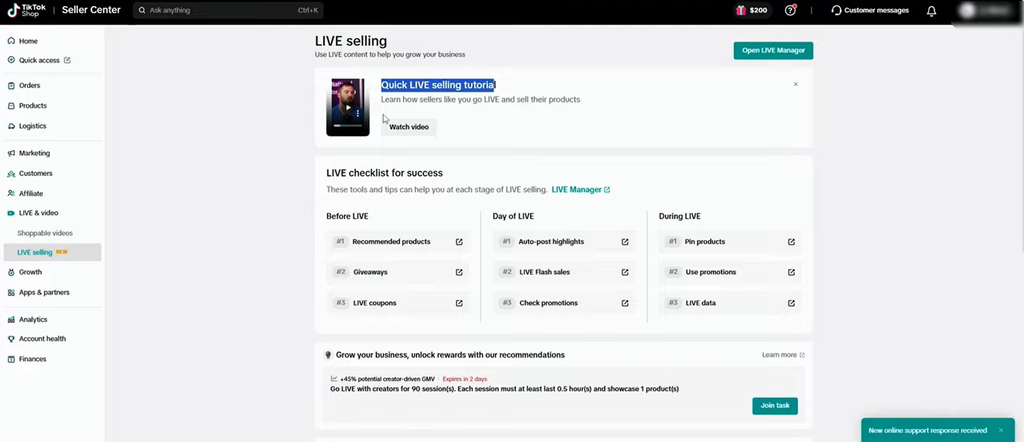
This is a useful starting point for sellers who are unfamiliar with the livestreaming process. Reviewing the available guidance can help you understand the tools and features before hosting your first session.
Step 2: Choose the Products You Want to Promote
Your product selection should be finalized before the livestream begins.
Choose items that are relevant to your target audience and prepare a clear presentation for each one. Consider which products need demonstrations, which have useful features to explain, and which offers you want to highlight.
In the tutorial, the preparation section explains how sellers can select recommended products to promote during their LIVE sessions.
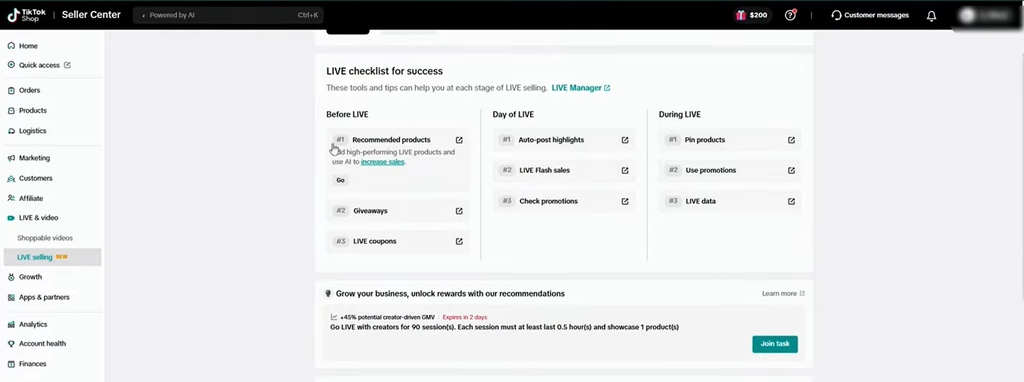
A useful product presentation plan should include:
- Product name and main features
- Benefits and practical uses
- Available variations and sizes
- Product price and eligible discounts
- Answers to common customer questions
Preparing these details helps the host explain each product accurately and maintain the flow of the session.
Step 3: Plan Giveaways and LIVE Coupons
Promotional activities can give viewers another reason to participate in your livestream.
TikTok Shop supports LIVE giveaways and eligible LIVE coupons. Sellers can use these features to reward viewers, introduce special offers, and encourage shopping activity.
For example, a seller could announce a giveaway during a product demonstration or highlight a coupon when discussing an eligible product.
In the tutorial, we review the giveaway and LIVE coupon options available during the preparation process.
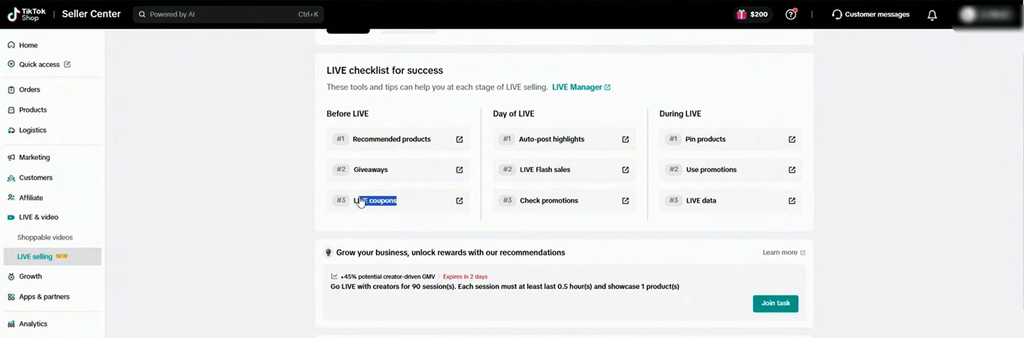
Before using these promotions, check their eligibility, discount conditions, validity periods, and product requirements. Make sure the offer is active and available to the intended audience.
Step 4: Review Your LIVE Setup
Before going LIVE, check that your selected products and promotional details are correct.
Confirm that the products are available, the prices are accurate, and any planned discounts are configured properly.
You should also check your camera, microphone, lighting, internet connection, and livestream presentation area.
A final review helps prevent avoidable interruptions once viewers start joining your session.
What Can Sellers Do During a TikTok Shop LIVE?
Once the livestream begins, sellers can use several features to manage products, interact with viewers, and encourage purchases.
Here are some of the key activities covered in our tutorial.
1. Promote Products in Real Time
During the broadcast, introduce your selected products and explain their features.
Rather than simply reading product descriptions, demonstrate how the items work and explain the problems they solve.
For example, a seller promoting a kitchen appliance can demonstrate its functions, discuss its capacity, and answer questions about its operation.
Remember to pin the corresponding product so viewers can easily access its listing.
2. Run LIVE Giveaways
Giveaways can encourage viewers to participate in a livestream.
Depending on the available feature and promotion rules, sellers can select eligible products for a giveaway and configure the required details through LIVE Manager.
Giveaways should have clear participation conditions. Sellers must follow the applicable TikTok Shop promotional policies and avoid misleading claims about prizes or eligibility.
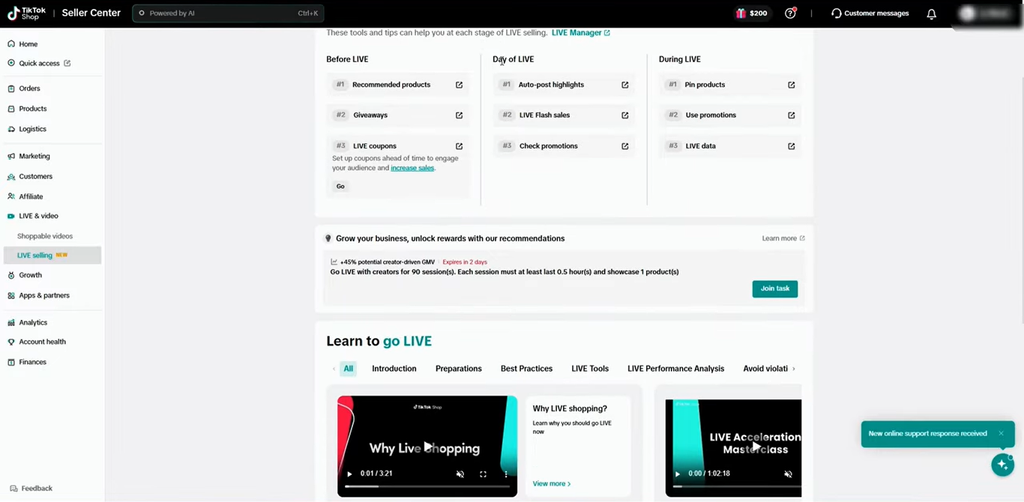
3. Offer LIVE Coupons
LIVE coupons allow eligible shoppers to claim discounts on qualifying products during a livestream.
When an eligible product is added to the LIVE shopping bag, the associated coupon may become available to viewers. Sellers can also pin an eligible coupon during the broadcast to make the offer more visible.
For example, a seller could introduce a product, explain its benefits, and highlight an available coupon to encourage interested viewers to complete their purchases.
4. Launch LIVE Flash Sales
Flash sales allow sellers to offer eligible products at promotional prices for a limited period or within specified inventory conditions.
When available, sellers can use LIVE Manager to configure and manage these promotions.
For example, a seller might offer a limited quantity of a product at a discounted price during a scheduled livestream.
In our tutorial, we also cover the flash sale option available for LIVE promotions.
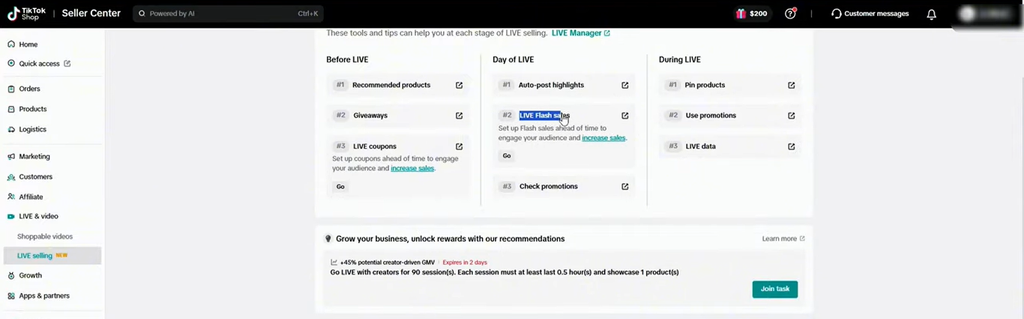
Before launching a flash sale, review the product selection, available inventory, discount, purchase limits, and promotion duration.
5. Share LIVE Highlights
After the livestream, sellers can use available LIVE replay or highlight features to extend the value of their content.
Useful moments from a session can help introduce products to people who missed the original broadcast. For example, a short clip showing a product demonstration or answering a frequently asked question can become another piece of promotional content.
Our tutorial also covers the option to review and share LIVE highlights.
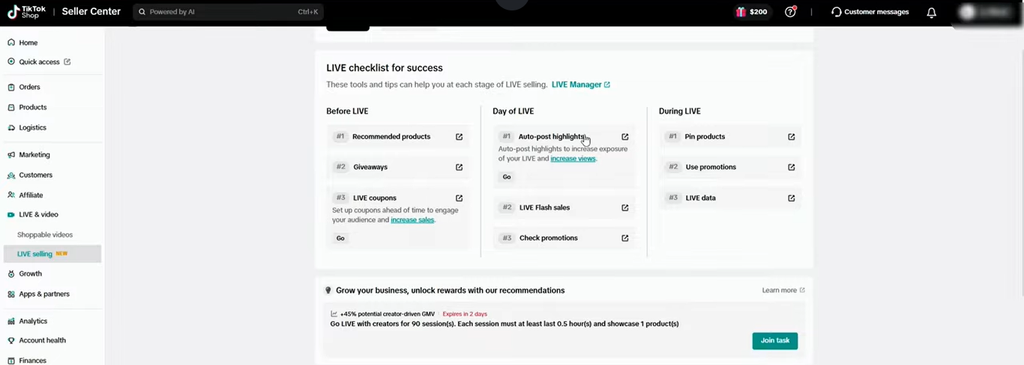
The availability and publishing options for highlights may vary by account and platform features.
How to Track TikTok LIVE Shopping Performance
Starting a livestream is only one part of the selling process. You also need to review its performance to understand what attracted viewers and which products generated interest.
TikTok Shop provides LIVE performance data through its available analytics and LIVE Manager tools.
Depending on your account and dashboard, you can review metrics such as:
| Metric | What It Tells You |
| LIVE views | How many views the livestream received |
| Peak concurrent viewers | The highest number of viewers watching simultaneously |
| Product clicks | How often viewers accessed featured products |
| Items sold | The number of products purchased |
| LIVE GMV | The gross merchandise value generated through the LIVE |
| Conversion performance | How effectively viewer activity translated into purchases |
| Engagement | How viewers interacted with the livestream |
We also review the LIVE performance section and explain how sellers can use the available data to evaluate their sessions.
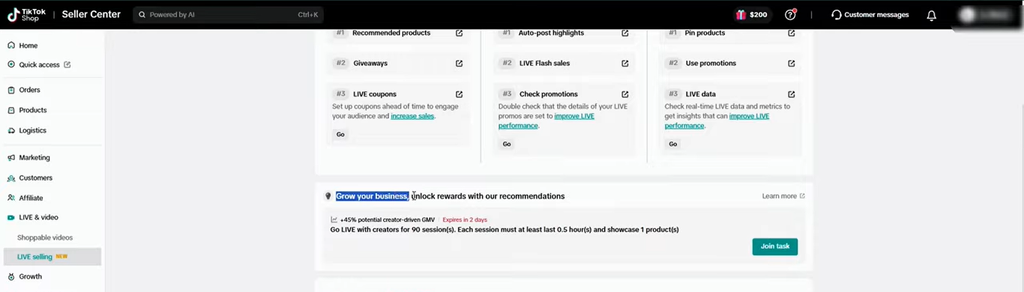
Use Performance Data to Improve Your Next LIVE
Once the session ends, review the available performance information and identify areas that need improvement.
For example:
- High views but low product clicks: Improve how you introduce products and direct viewers to the pinned listings.
- High product clicks but few purchases: Review product pricing, listing information, delivery details, and customer objections.
- Low viewer engagement: Add more demonstrations, questions, and interactive activities.
- Strong sales for one product: Consider featuring that product earlier in your next session.
You can also review viewer comments and questions to identify which product details need clearer explanations.
The goal is to use performance data to make each subsequent livestream more relevant to your audience.
Best Practices for Selling Through TikTok LIVE
Sellers can improve their livestream shopping strategy by following a few practical guidelines.
Prepare a Product Sequence
Choose your products in advance and organize them according to your presentation plan. Start with products that are relevant to your audience and easy to demonstrate.
Demonstrate Instead of Just Describing
Show viewers how a product works. Demonstrations give customers a better understanding of its features and practical uses.
Respond to Viewer Questions
Monitor comments throughout the session. Answer questions about product specifications, available options, pricing, and delivery using accurate information.
Use Promotions Strategically
Coupons, giveaways, and flash sales can support your promotional strategy. However, use them with a clear purpose and check the applicable conditions before announcing an offer.
Maintain a Consistent LIVE Schedule
A consistent schedule gives interested viewers more opportunities to join your sessions. Promote upcoming livestreams through your regular TikTok content where appropriate.
Review Performance After Every Session
Check your analytics, identify your best-performing products, and look for opportunities to improve your next presentation.
Common Mistakes to Avoid During TikTok Shop LIVE Selling
Even with access to useful shopping features, sellers can struggle to convert viewers if their livestreams are poorly planned.
Here are some common mistakes to avoid:
| Mistake | How to Avoid It |
| Starting without a product plan | Select and organize your products before going LIVE. |
| Forgetting to pin products | Pin the relevant item when discussing it. |
| Announcing unavailable discounts | Verify coupon eligibility and promotion details first. |
| Ignoring viewer comments | Assign a moderator or monitor questions during the session. |
| Spending too much time on one product | Follow a planned presentation schedule. |
| Focusing only on views | Review product clicks, orders, GMV, and conversion performance. |
| Making unsupported product claims | Use accurate product information and follow TikTok Shop policies. |
Avoiding these mistakes helps create a more organized shopping experience and makes it easier to assess your LIVE selling results.
How Tiksly Can Help You Grow Your TikTok Shop
Managing a TikTok Shop involves product listings, content creation, promotions, customer support, and performance tracking. Tiksly helps brands manage these activities through TikTok Shop management, influencer outreach, paid advertising, and virtual assistant services. The team also offers one-to-one consultations to help sellers identify growth opportunities, improve shop operations, and develop a sales-focused strategy aligned with their business goals.
Conclusion
TikTok LIVE and TikTok Shop give sellers an effective way to showcase products, interact with potential customers, and generate sales through livestream shopping. Features such as pinned products, LIVE coupons, giveaways, and performance analytics help create engaging shopping experiences and improve selling strategies. However, achieving consistent results requires proper planning, audience engagement, and ongoing performance tracking.
If you need support managing your TikTok Shop, running promotional campaigns, or improving your sales strategy, book a one-to-one consultation with Tiksly experts. Our team can help you identify growth opportunities and find the right services for your business needs.
FAQs
1. How does TikTok LIVE work with TikTok Shop?
TikTok LIVE connects livestreaming with TikTok Shop product listings. Sellers and eligible creators can add products to a livestream, demonstrate them, pin product links, interact with viewers, and allow shoppers to access the products while watching.
2. Can you sell products directly through TikTok LIVE?
Yes. Eligible sellers and creators can promote shoppable products during a LIVE session. Viewers can tap the pinned products or shopping bag to explore product details and complete purchases through TikTok Shop.
3. How do I add products to my TikTok LIVE?
Access the available LIVE shopping tools through TikTok’s Creator Center or LIVE Manager. Select products from your shop or eligible product sources, add them to your LIVE shopping bag, and organize their display order before starting the broadcast. You can pin individual products during the session.
4. Can I offer discounts during TikTok LIVE?
Yes. Eligible sellers can use LIVE coupons and other available promotional tools to offer discounts during livestreams. Coupon eligibility, funding, product requirements, and validity conditions depend on the promotion and seller market.
5. How can I increase sales through TikTok LIVE?
To improve LIVE selling performance, choose relevant products, demonstrate their features, pin the products being discussed, answer viewer questions, and use eligible promotions strategically. Review your LIVE analytics after each session to identify which products and presentation methods generate the strongest results.