 Ayesha Khan
TikTok Shop FBT inventory management helps sellers track their products stored in TikTok’s fulfillment warehouses. By monitoring stock levels, reserved units, inventory records, and inactive products, sellers can make better decisions about stock availability and inventory costs.
TikTok Shop’s Fulfilled by TikTok (FBT) service handles eligible order fulfillment tasks, including storage, picking, packing, and shipping. However, sellers still need to monitor their inventory to maintain stock availability and identify products that may need attention.
In this guide, we’ll explain how to manage TikTok Shop FBT inventory, review inventory records, check channel inventory, and monitor inactive products. We’ll also show you which screenshots to capture from the tutorial video and the exact timestamps where you can find them.
What Is TikTok Shop FBT Inventory Management?
TikTok Shop FBT inventory management involves monitoring products stored in TikTok’s fulfillment warehouses and checking how much stock is available for sale and order fulfillment.
The inventory section in TikTok Shop Seller Center provides information about product quantities, stock status, warehouse locations, and inventory changes. Sellers can use these details to understand their stock levels and identify products that may require action.
Effective inventory management helps you:
- Monitor available and reserved stock.
- Check inventory stored in TikTok warehouses.
- Review inventory changes and related orders.
- Identify inactive products that may continue to incur storage fees.
- Make informed decisions about replenishment and inventory removal.
Let’s look at the main inventory sections and how to use them.
How to Access TikTok Shop FBT Inventory
To review your FBT stock, open TikTok Shop Seller Center and navigate to the inventory section. The available options may vary depending on your account, warehouse setup, and current Seller Center interface.
The tutorial covers three main inventory views:
- Goods Inventory: View products stored in TikTok warehouses and check their inventory status.
- Channel Inventory: Review stock allocated and available for sale through the relevant sales channel.
- Inactive Inventory: Identify products that have recorded little or no sales over an extended period.
The inventory section also provides inventory records and logs, which help you review stock movements and changes over time.
Source: Tiksly
1. Understand Goods Inventory in TikTok Shop FBT
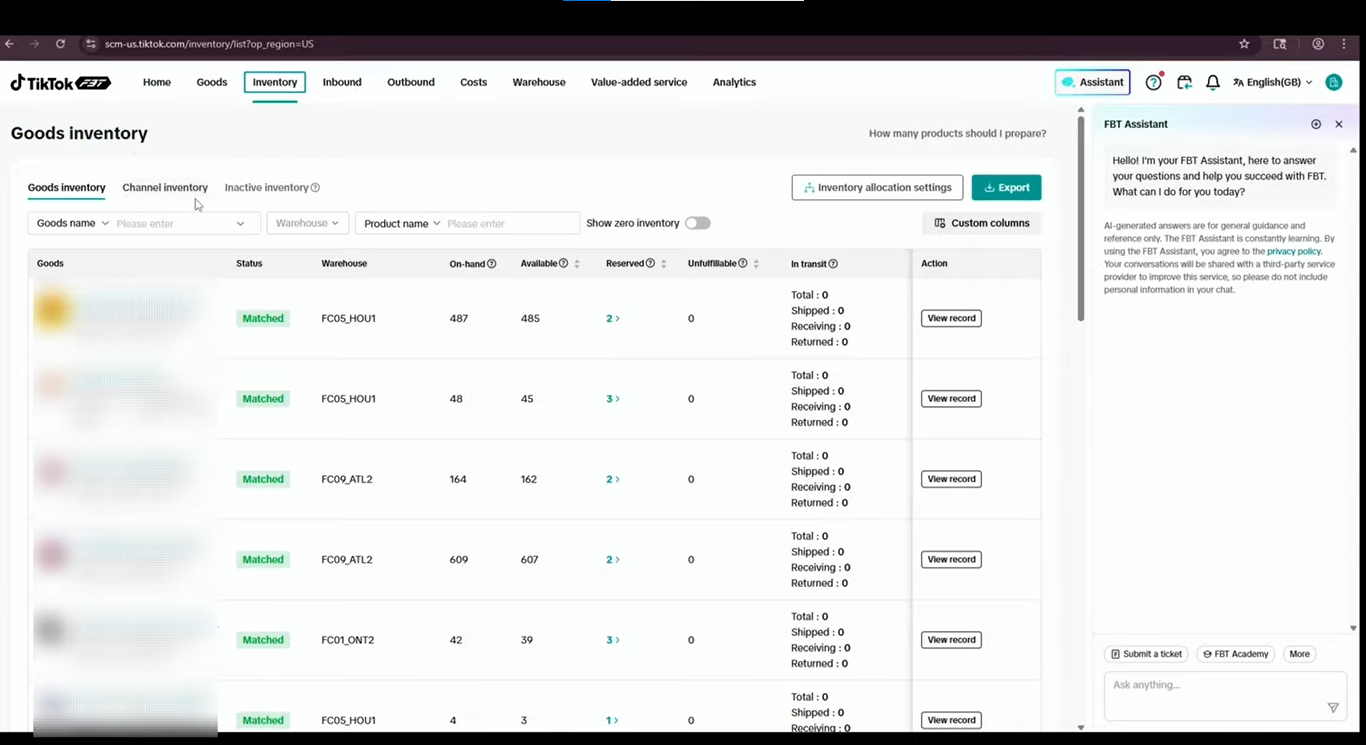
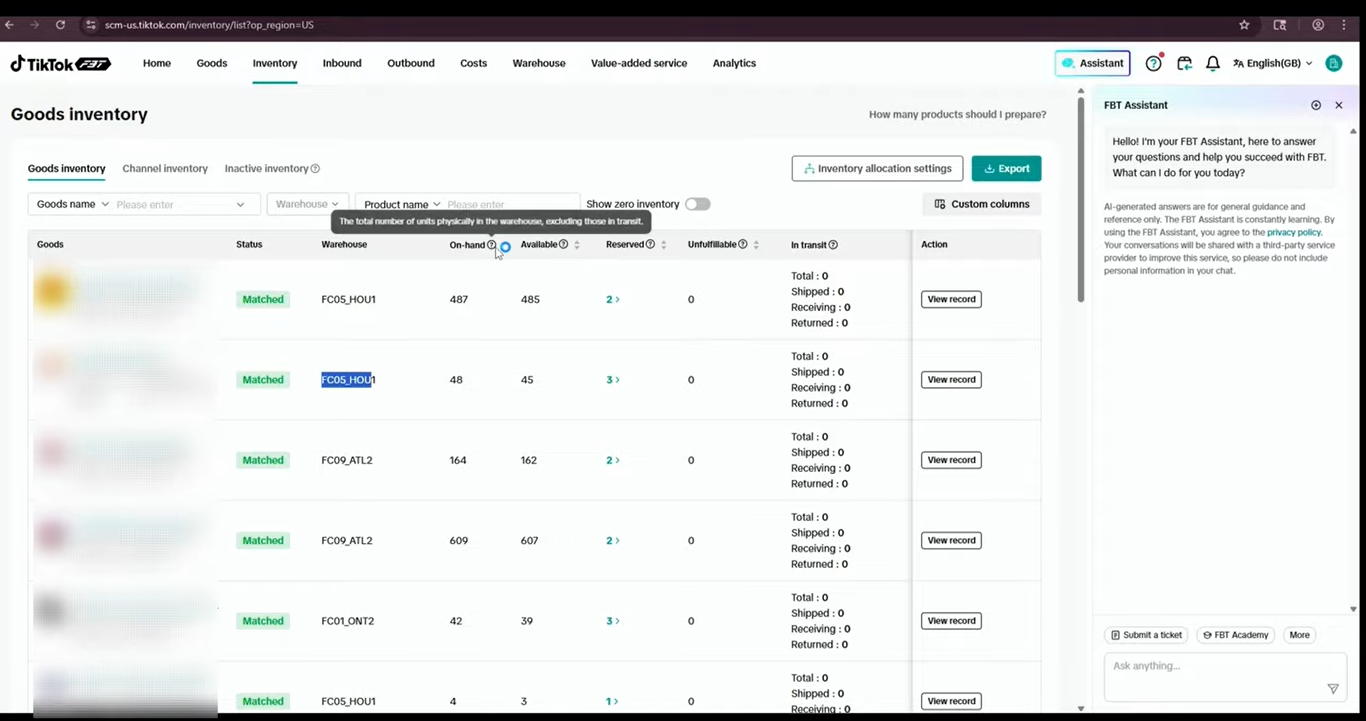
Goods Inventory shows products stored in TikTok’s fulfillment warehouses. You can review product details, warehouse locations, stock quantities, and inventory statuses from this section.
The tutorial displays several inventory fields, including:
- On-hand inventory: The total number of units physically recorded in the warehouse, excluding units in transit.
- Available inventory: The number of units currently available to fulfill orders.
- Reserved inventory: Units set aside for orders and therefore unavailable for other purchases.
- Unfulfillable inventory: Units that cannot currently be used to fulfill orders.
- In-transit inventory: Units moving between locations or otherwise recorded as in transit, where this field is available.
These figures help you understand the difference between total warehouse stock and the stock you can use to fulfill orders.
For example, the tutorial shows a product with 487 units of on-hand inventory, 485 available units, and two reserved units. The reserved units account for the difference between the on-hand and available quantities.
This distinction matters because a product may have stock in the warehouse but fewer units available for new orders.
Source: Tiksly
How to Check Unavailable Stock
Goods Inventory can also help you identify products with units that are not available for order fulfillment.
Check the inventory status to understand whether some stock is reserved, unfulfillable, or otherwise unavailable. If the numbers differ from your expectations, review the product’s inventory records to investigate the change.
Do not assume that all unavailable stock is damaged. Check the status and supporting records before deciding what action to take.
2. Review TikTok Shop FBT Inventory Records
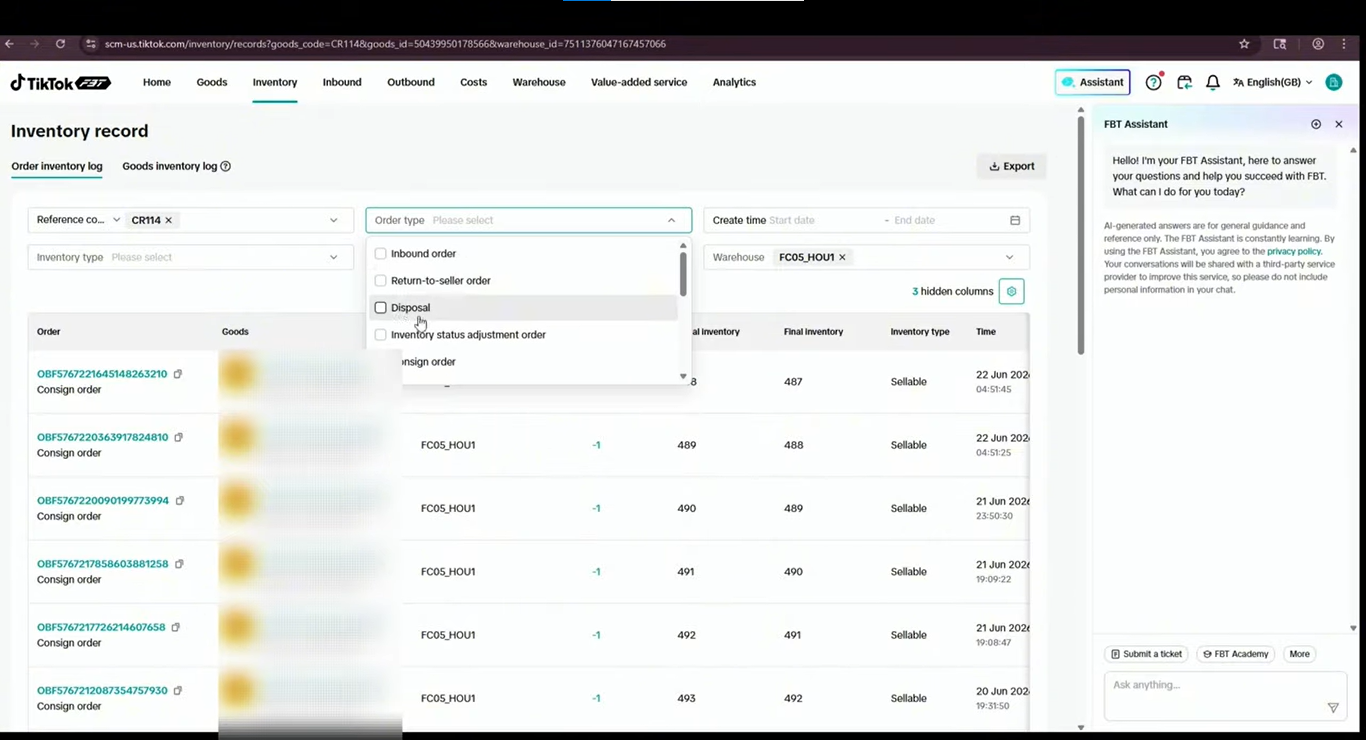
Inventory records help you understand how a product’s stock changes over time. They provide details about inventory movements and the transactions associated with those changes.
To review a product’s inventory history, open the relevant product in Goods Inventory and access its inventory record.
Source: Tiksly
Depending on the available filters and account interface, you can review details such as:
- Reference information.
- Order type.
- Inventory status.
- Creation time.
- Inventory type.
- Order ID.
- Warehouse.
- Initial and final inventory quantities.
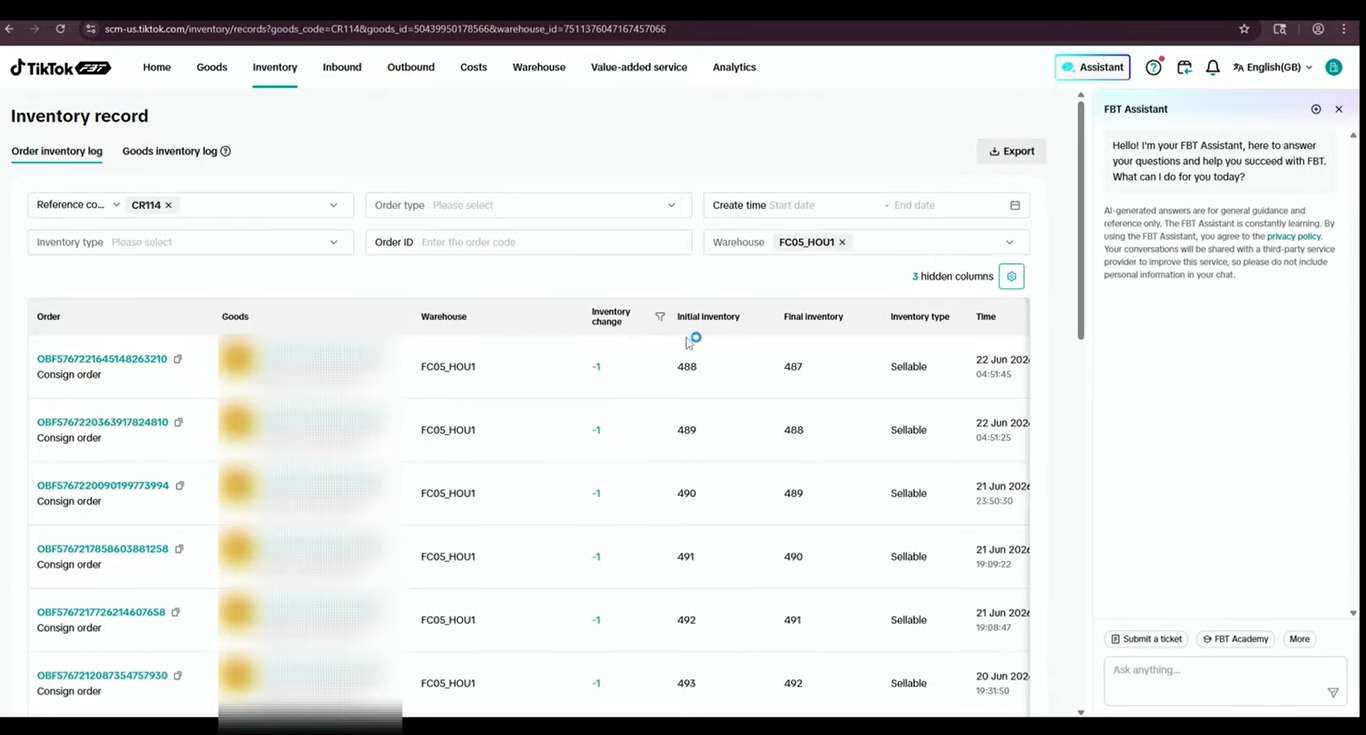
The tutorial also demonstrates inventory records associated with consign orders. These records help sellers trace stock changes connected to particular transactions.
For example, the video displays an initial inventory quantity of 488 units and a later quantity of 487 units. Reviewing the associated inventory change helps explain how the recorded stock level changed.
If you notice an unexpected stock difference, check the relevant order and inventory details before making adjustments.
Source: Tiksly
3. Use the Goods Inventory Log
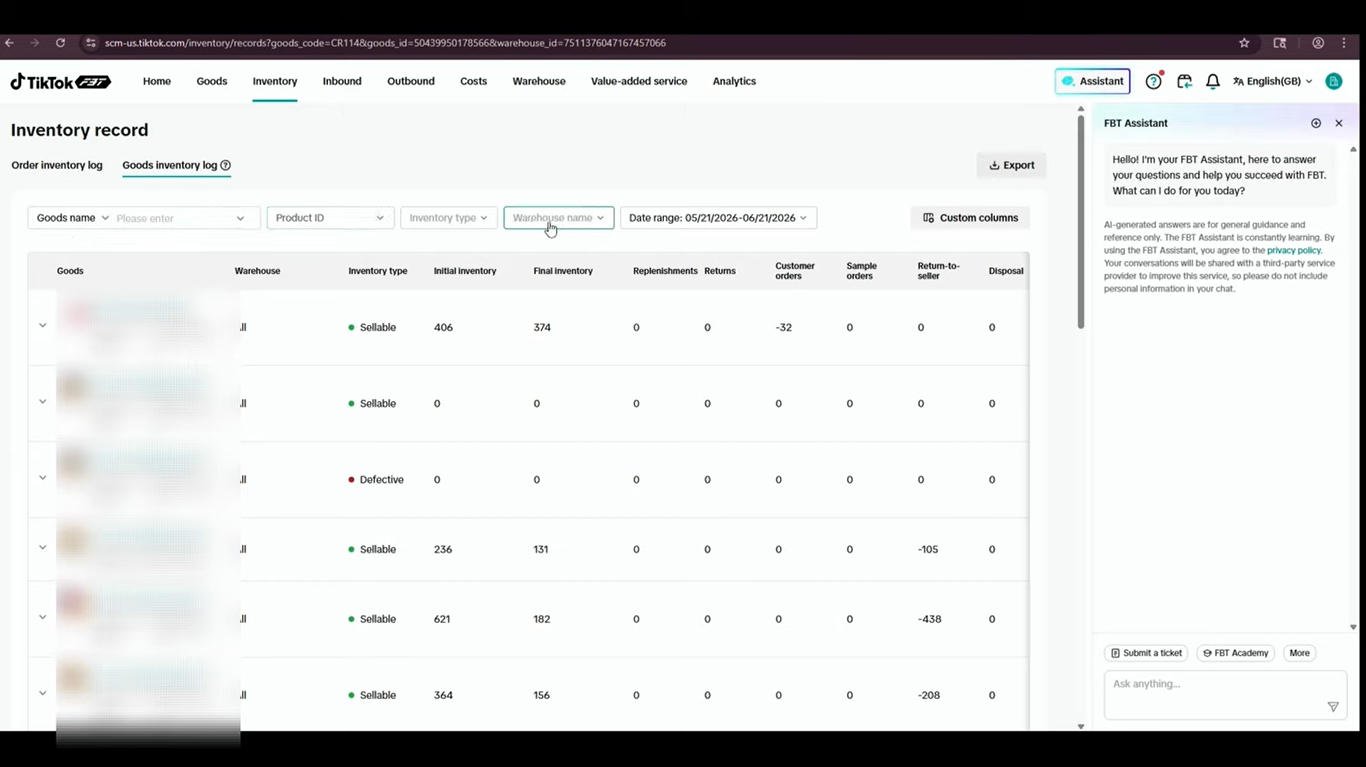
The Goods Inventory Log provides another way to review inventory changes. Instead of checking only one product’s current stock, you can use the available filters to find relevant inventory records.
In the tutorial, the log includes filters for:
- Goods name.
- Product ID.
- Inventory type.
- Warehouse.
- Date range.
These filters help you narrow the results when investigating a stock movement or reviewing inventory activity during a specific period.
The log also displays inventory types, including sellable and defective stock, along with initial and final inventory quantities.
For example, if a product’s available stock suddenly decreases, you can filter the log by product and date range to review the recorded changes. You can then use the related information to investigate the reason for the difference.
Source: Tiksly
Regularly reviewing inventory logs can help you identify stock discrepancies and maintain better inventory records.
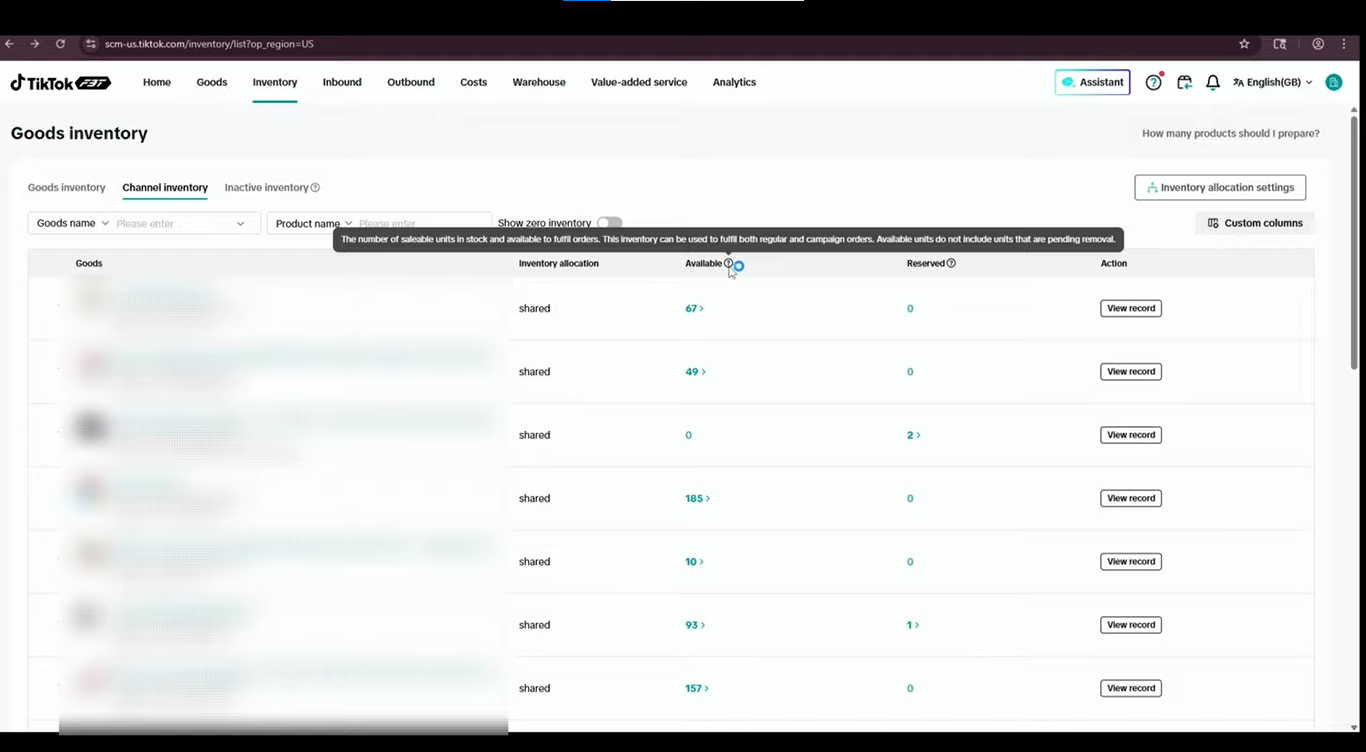
4. Monitor Channel Inventory
Channel Inventory provides a view of stock available for sale through the relevant TikTok Shop channel and FBT setup.
The tutorial shows several fields in this section, including:
- Goods name.
- Inventory allocation.
- Available inventory.
- Reserved inventory.
- Actions.
The allocation field helps you understand how inventory is assigned within the displayed setup. The available and reserved quantities help you see how much stock can be used for new orders and how much has already been set aside.
Available inventory represents sellable units available for order fulfillment. As the tutorial explains, available units do not include pending removals.
This information is useful when checking whether a product has enough stock to support sales. A product may have units recorded in the warehouse, but the quantity available for sale can be lower because some units are reserved or otherwise unavailable.
Check Channel Inventory regularly, especially for products that receive frequent orders or are running low on stock.
If the available quantity looks lower than expected, review the Goods Inventory view and relevant inventory records to understand the difference.
Source: Tiksly
5. Check Inactive Inventory in TikTok Shop FBT
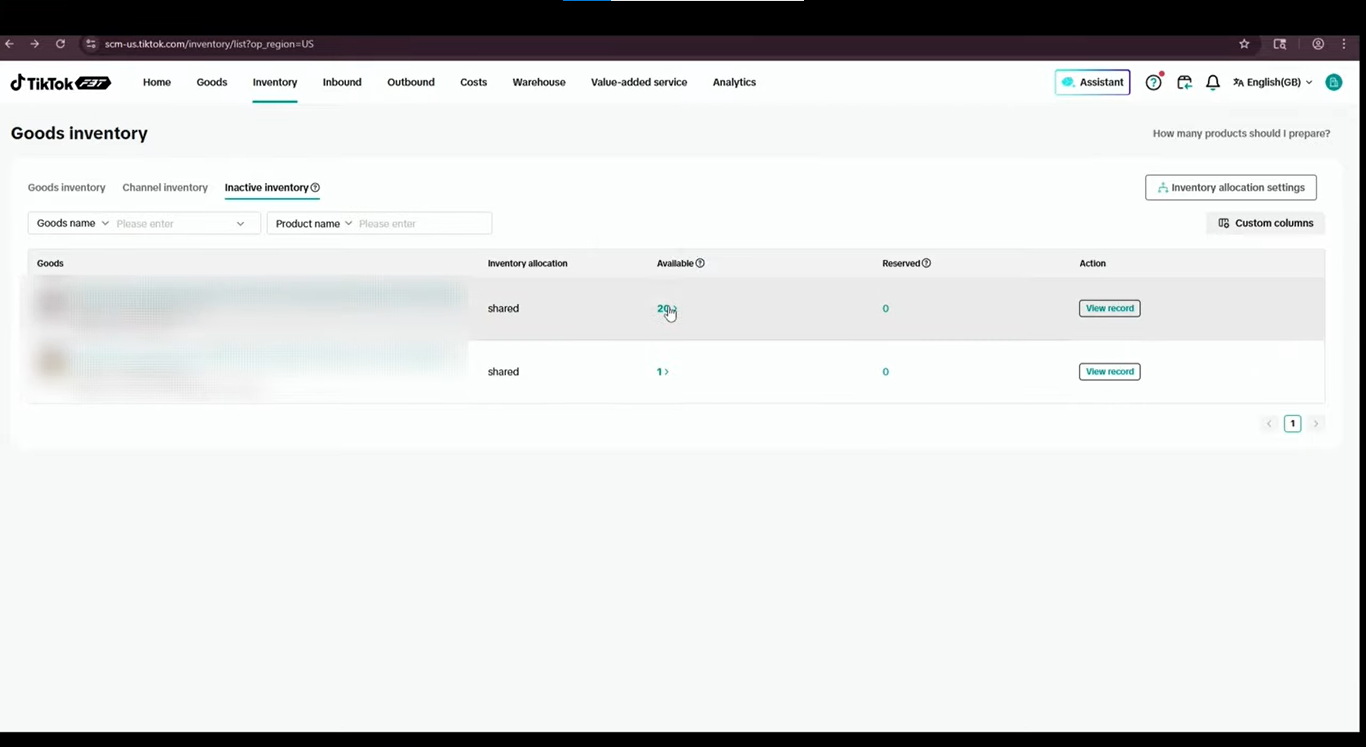
Inactive Inventory helps sellers identify products that have recorded little or no sales over an extended period.
These products deserve attention because inventory stored in TikTok’s warehouses may continue to incur storage fees, subject to the applicable FBT terms and fee rules.
A product with slow sales can tie up stock and increase storage costs without generating enough revenue to justify keeping it in the warehouse.
The tutorial shows an inactive product with 20 available units and one unit in another displayed inventory field. These figures illustrate why sellers should review both the stock quantity and the product’s sales activity before deciding what to do next.
When checking inactive inventory, consider the following questions:
- Has the product recorded sales recently?
- How many units remain available?
- Are there enough expected sales to justify keeping the stock in the warehouse?
- Would replenishment, a sales campaign, or inventory removal make more sense?
- What storage or removal fees may apply?
The answers will depend on your sales history, product demand, inventory levels, and FBT fee structure.
If a product has remained inactive for a long time, review its performance and the relevant fees. You may decide to improve its sales performance or remove the stock if keeping it in the warehouse no longer makes financial sense.
Check the current FBT terms before arranging a removal, as eligibility, processing requirements, and charges may vary.
Source: Tiksly
6. Best Practices for TikTok Shop FBT Inventory Management
Understanding the inventory sections is the first step. Sellers should also establish a routine for reviewing stock and responding to inventory changes.
Check Available Stock Regularly
Review Goods Inventory and Channel Inventory to understand how much stock is available for new orders. Pay particular attention to products with high sales volumes or low remaining quantities.
Investigate Unexpected Inventory Changes
Use inventory records and the Goods Inventory Log to trace stock movements. Check the associated order details, inventory status, and warehouse information before taking action.
Monitor Reserved and Unfulfillable Units
Reserved units may be linked to pending orders, while unfulfillable units cannot currently be used to fulfill orders. Review these quantities to understand why total warehouse stock differs from available stock.
Review Slow-Selling Products
Check Inactive Inventory regularly to identify products with little or no recent sales. Assess their sales performance and potential storage costs before deciding whether to keep or remove them.
Keep Inventory Records Under Review
Use the available filters to investigate stock movements over a relevant date range. Consistent monitoring can help you identify discrepancies sooner and make better inventory decisions.
Check Current FBT Policies and Fees
Inventory rules, storage charges, and removal procedures can vary by marketplace, product, and account arrangement. Review the current terms in the Seller Center before making decisions that may affect your costs.
How Tiksly Helps You Manage TikTok Shop FBT Inventory
Managing FBT inventory requires more than checking stock levels. Sellers need to track available products, investigate inventory changes, and identify slow-moving stock that may increase storage costs. These tasks become harder when store operations, product listings, order activity, and sales performance also demand attention.
Tiksly helps TikTok Shop sellers manage their store operations while keeping inventory visibility and product performance in focus. With support for day-to-day TikTok Shop management, sellers can dedicate more time to reviewing stock trends, addressing inventory issues, and making informed decisions about their products.
A structured approach to store management helps sellers stay aware of inventory challenges and respond before they affect sales or increase operating costs.
Conclusion
TikTok Shop FBT inventory management helps you track warehouse stock, review inventory changes, and identify slow-selling products. Regularly checking Goods Inventory, Channel Inventory, and Inactive Inventory helps you monitor stock levels and manage potential storage costs.
Need help managing your TikTok Shop? Book a free 1:1 consultation with Tiksly experts to discuss your store management needs.
FAQs
What is FBT inventory management on TikTok Shop?
FBT inventory management involves monitoring products stored in TikTok’s fulfillment warehouses, checking available and reserved stock, reviewing inventory movements, and identifying products that may need replenishment or removal.
What is the difference between on-hand and available inventory?
On-hand inventory represents the total recorded units physically held in the warehouse, excluding units in transit. Available inventory represents the units currently available to fulfill orders. Reserved or otherwise unavailable units can cause the two quantities to differ.
What is Channel Inventory in TikTok Shop?
Channel Inventory shows stock information for products available for sale through the relevant TikTok Shop channel and FBT setup. Depending on the interface, it includes product names, inventory allocation, available units, reserved units, and available actions.
What is Inactive Inventory in TikTok Shop FBT?
Inactive Inventory identifies products that have recorded little or no sales over an extended period. Sellers can review these products to assess stock levels, sales performance, and potential storage costs.
How can I check TikTok Shop FBT inventory records?
Open Goods Inventory, select the relevant product, and access its inventory record. Review the available reference, order, warehouse, inventory status, and stock quantity details to understand recorded inventory changes.
Can inactive FBT inventory lead to storage fees?
Yes, inactive products stored in TikTok’s fulfillment warehouses may continue to incur storage fees, depending on the applicable FBT terms. Check your current Seller Center fee information before deciding whether to keep or remove stock.
How can I improve TikTok Shop inventory management?
Review available stock regularly, investigate unexpected changes through inventory records, monitor reserved and unfulfillable units, assess slow-selling products, and check current FBT policies before making inventory decisions.