 Ahmad Amin
Social commerce is growing rapidly, and brands that act fast can capture major opportunities. TikTok Shop now hosts over 15 million merchants with 70 million products across 750+ categories, making it a crucial platform for online sellers.
Rapid growth brings operational challenges. Manual product listings and inventory updates can fall behind during viral spikes, causing errors, overselling, and lost revenue. Accurate, timely listings are essential for customer trust and sales.
This guide covers TikTok Shop automation, focusing on two key strategies: bulk product listing to upload and manage large catalogs efficiently, and real-time inventory syncing to keep stock levels accurate across all channels. Implementing these approaches helps sellers save time, reduce errors, and focus on creating content that drives growth.
Why Automation is Non-Negotiable for Scaling E-commerce
Automation plays a crucial role in helping sellers keep up with TikTok Shop’s pace. When a product gains attention, buyers act quickly, and any delay on the seller’s side can interrupt the entire momentum. Automation removes these delays and creates a smooth buyer experience.
The Conversion Advantage: Removing Friction
TikTok Shop stands out because shopping and entertainment appear together in one place. Many viewers make instant purchase decisions when they see something they like. To support this behavior, your listings must be updated and ready at all times.
Without automation, several problems can occur:
- Product may not be listed while traffic is peaking
- Stock numbers might be outdated
- Errors may prevent the buyer from completing the order
A slow or incomplete listing can cause you to lose the viral traffic window. These moments can bring hundreds or thousands of sales, so missing them directly affects revenue.
The Danger Zone: Inventory Synchronization and Compliance
Once conversions begin, accurate inventory becomes the next challenge. Managing stock manually while scaling is unpredictable and stressful. Overselling happens easily when your data doesn’t update instantly across channels.
TikTok Shop tracks a metric called Seller Fault Cancellation Rate (SFCR). Sellers must keep this number at 2.5 percent or lower. High cancellation rates usually happen when:
- A product is out of stock on another platform
- Fulfillment is delayed
- Inventory updates fail or lag
Real-time syncing helps prevent these issues. It keeps stock levels aligned across Shopify and TikTok Shop, supports compliance, protects your seller rating, and maintains a strong reputation.
To tackle these challenges, we at Tiksly offer TikTok Shop Automation. Our AI-powered system handles product uploads, inventory updates, order processing, and customer inquiries, keeping your listings accurate, live, and ready to capture sales.
With our automation, you can focus on content and growth while we ensure your shop stays fully compliant with TikTok Shop standards.
Pathway to Scale: Selecting the Right Multichannel Integration Tool
Growing on TikTok Shop becomes much smoother when you have the right integration setup. Instead of switching between dashboards or handling technical configurations, a strong multichannel tool keeps everything organized in the background. This frees you to work on sales, content, and brand building.
Connector Apps: A Simple Option for Non-Technical Sellers
Connector apps serve as a central hub for product listings, inventory, and orders across multiple platforms. Popular options include:
- The official TikTok for Shopify app
- ShopSync
- 3Dsellers
These tools are built for sellers who want dependable automation without writing code. They help you:
- Sync large catalogs with one action
- Maintain accurate stock through real-time updates
- Apply pricing rules
- Use category templates for clean and fast product mapping
This keeps your catalog consistent and lowers the risk of errors as your business expands.
API Integration vs Connector Apps: Making the Right Choice
TikTok Shop provides Partner APIs for brands that have developers on their team. These APIs offer deep control over product management, orders, and inventory. But this path requires technical skills and ongoing maintenance. It involves tasks such as:
- Managing authorization flows
- Handling tokens
- Configuring detailed workflows
For most sellers, a connector app is the more practical choice. It simplifies day-to-day operations, supports fast scaling, and avoids long development cycles. This allows you to focus more on visibility and sales rather than troubleshooting backend systems.
Key Automation Pathways for TikTok Shop
| Pathway | Target User | Pros | Cons |
|---|---|---|---|
| E-commerce Connector App (Shopify, ShopSync) | Non-Technical Seller | Quick setup, bulk sync for thousands of products, real-time syncing, unified dashboard, zero coding | Monthly cost, reliance on third-party performance |
| Custom API Integration | Developer or Large Enterprise | Full control, custom workflows, direct API access | High complexity, developer dependency, ongoing token and authorization management |
Step-by-Step Bulk Listing Workflow (The Sync)
This stage focuses on building a secure and stable link between your store and TikTok Shop, then preparing every part of your product data so the system can upload it in bulk without running into errors.
A smooth setup here saves hours of manual work later and reduces the chance of mass rejections during product review.
Step 1: Connecting and Authorizing Your Store
To begin, you need to connect your primary e-commerce store with TikTok Shop through a connector app or the official sales channel.
Installing the Sales Channel
If you use Shopify, simply search for “TikTok” in the Shopify App Store and install the official TikTok sales channel. Other platforms also offer similar connectors. This installation acts as the bridge the system uses to exchange product and order data.
Setting Up Your TikTok Shop Seller Center
After installation:
- Log in to TikTok Shop Seller Center
- Complete your business profile, including contact details and store information
- Read and accept the Merchant Terms of Service
- Complete business verification by uploading your identification and business documents
Verification is important because TikTok will not allow product uploads until your business is fully approved.
If you’re just starting on TikTok Shop, using a professional TikTok Shop Account Setup service can ensure your store is verified, compliant, and ready for bulk listings.
Authorizing the Connector App
Once verification is complete, authorize the connector app. Authorization gives the app permission to:
- Read and update your product catalog
- Sync inventory levels
- Sync price changes
- Pull order information
- Update fulfillment statuses
This step creates the secure connection your automation system depends on. Without correct permissions, bulk sync will fail or give you repeated errors later.
Step 2: The Compliance Gate
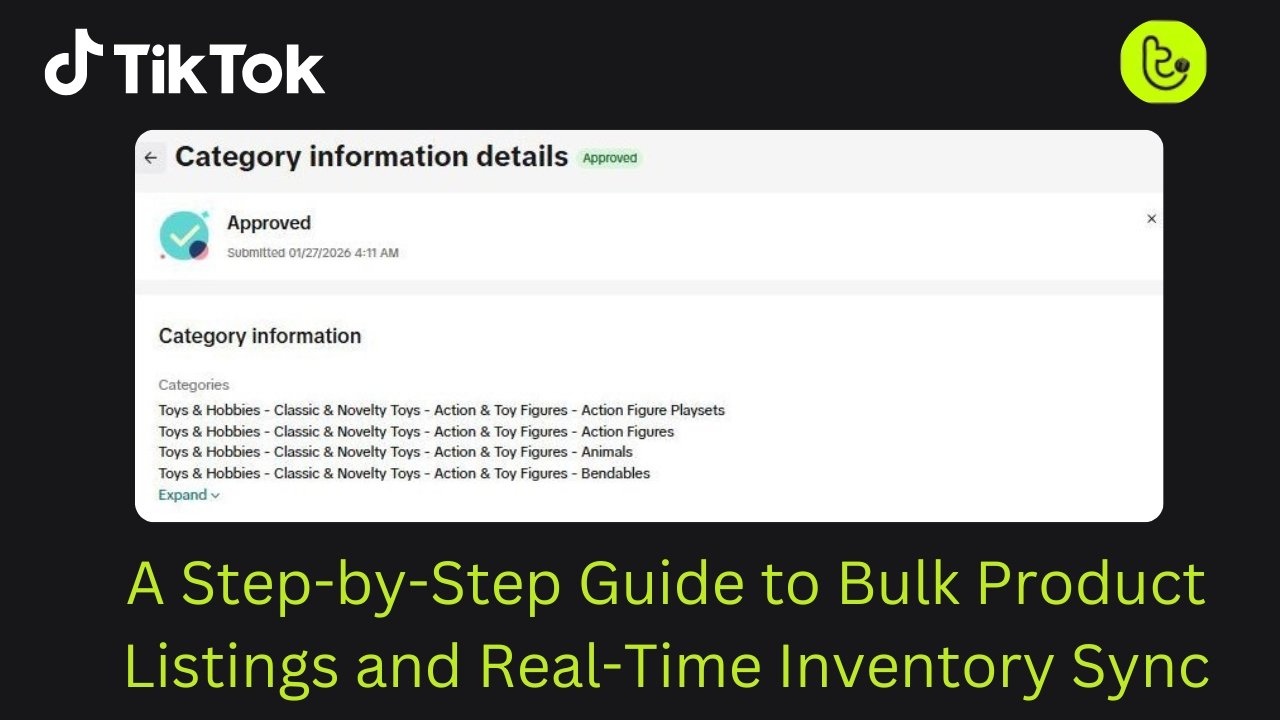
Before you begin pushing hundreds of products to TikTok Shop, you must match your store’s categories to TikTok Shop’s category structure. TikTok uses a detailed, multi-layered taxonomy that determines what information each listing must include.
Why Category Mapping Matters
Each category has specific required attributes. For example:
- Clothing requires size, color, and material
- Beauty items often require ingredients or shade names
- Electronics may need battery type, wattage, capacity, or model number
If these mandatory attributes are missing, TikTok will reject the listing during review. Mapping everything correctly prevents errors during bulk upload and helps TikTok classify your products for search visibility.
Using Category Templates
Connector apps simplify this process by offering Category Templates that allow you to:
- Edit attributes in bulk
- Apply filters to large catalog groups
- Add missing data for multiple products at once
- Update product variations faster
- Standardize attribute formatting across your catalog
This stage is the foundation of your automation workflow. Clean and complete data here saves hours of rework later.
Step 3: Executing the Bulk Synchronization
Once your categories and attributes are fully prepared, you can start the bulk sync.
Starting the Bulk Sync
Most apps have a feature labeled “Bulk Sync,” “Batch Sync,” or “Bulk Upload.” With one action, you can push hundreds or even thousands of products directly to TikTok Shop.
Before syncing, double-check:
- All mandatory attributes
- Category mapping
- Product titles
- Images and image URLs
- SKUs and identifiers
- Parcel weight and dimensions
- Pricing and stock levels
Approval and Review Process
After uploading, TikTok will review the listings. The platform checks for:
- Accurate product data
- Correct category placement
- Valid image and video formats
- Compliance with prohibited items policy
- Mandatory identifier codes (GTIN, UPC, EAN, ISBN)
- Shipping information accuracy
If a product that is already live fails review after an edit, TikTok keeps the older version visible. This prevents disruptions, but it also shows why thorough preparation in the mapping stage is important. Clean data increases first-attempt approvals and keeps your product catalog stable.
To keep your listings and inventory up to date without extra effort, consider a TikTok Shop Virtual Assistant service, which can handle product research, data entry, and customer support tasks
Protecting Profitability with Real-Time Data Sync
Bulk listing gets your products online, but real-time syncing is what protects your sales, compliance score, and revenue. Once your catalog is live, every update made in your main store must reflect on TikTok Shop at the same moment.
Synchronization Control and Rules
Two areas require the most attention: inventory and pricing.
Inventory Syncing
Inventory syncing prevents overselling. When your stock decreases on Shopify, Amazon, or any connected channel, the change should instantly reflect on TikTok Shop. This protects your Seller Fault Cancellation Rate. TikTok requires sellers to maintain their SFCR at 2.5 percent or below. Most cancellations happen because of stock mismatches caused by manual updates.
Price Syncing
Automatic price syncing helps maintain consistency across all channels. This matters when you:
- Run flash sales
- Adjust pricing based on competitors
- Update discount codes
- Change shipping or handling fees
Misaligned pricing can trigger compliance warnings, so real-time syncing keeps your listings safe.
Product Detail Syncing
Apart from price and stock, your product details also need to stay aligned across platforms. This includes:
- Titles
- Descriptions
- SKUs
- Variation mapping
- Media files (images and videos)
If these areas don’t match, TikTok may block edits or delay updates.
For sellers managing multiple products and channels, a TikTok Shop Management service helps streamline daily operations, from inventory updates to order handling.
Unified Order Management and Fulfillment
Multichannel integration shows its real power when orders start flowing from TikTok Shop into your main e-commerce system.
Centralized Order Processing
Instead of checking multiple dashboards, your TikTok orders appear directly in your main order management page. This gives your team:
- One workflow
- One fulfillment queue
- One area to manage tracking
- One place to update order notes
This setup reduces mistakes and speeds up fulfillment.
Automated Fulfillment with Shipping Software
Shipping tools like ShipStation or Shippo work as the final layer of automation. They help you:
- Import orders automatically
- Compare carrier rates
- Print labels in batches
- Update tracking automatically
- Send tracking numbers back to TikTok Shop
This creates a smooth fulfillment cycle that keeps customers informed and reduces the chances of late delivery violations.
Data Quality, SEO, and Compliance Checklist
Automation can only deliver results when the data feeding it is accurate. If your source data contains errors, a bulk sync will simply multiply those mistakes across hundreds or thousands of listings. Maintaining strong data quality and marketplace SEO practices is essential for smooth uploads and long-term account health.
Product Listing Optimization (Marketplace SEO)
To improve visibility on TikTok Shop and help shoppers find your products, each listing must be designed around user intent.
Keyword Strategy
- Choose keywords that reflect how users naturally search for your product.
- Focus on words that match both the product and its presentation in your videos.
- Start with broad terms and refine over time.
Example: Begin with “eye shadow” and later test phrases like “best eye shadow.”
Title Constraints
- Titles should fit fully on mobile screens.
- Aim for 60–100 characters to maintain clarity and visibility.
Description Depth
- TikTok recommends descriptions longer than 500 characters.
- A detailed description improves search ranking, supports compliance, and gives shoppers the confidence to buy.
The Compliance Checklist: Mandatory Fields
TikTok’s review process is strict. Missing information can trigger mass rejections during bulk uploads. One of the most critical fields is the identifier code (GTIN, UPC, EAN, or ISBN), which validates product authenticity and supports the Product Upload Accelerator.
Before running a bulk upload, ensure your data is complete. Automation multiplies existing errors, missing fields can cause everything to fail review.
Mandatory Product Fields for Successful Bulk Upload
| Field | Requirement | Format/Unit | Purpose |
|---|---|---|---|
| Product Name / Title | Mandatory (25–80 characters) | Text | Improves search visibility and marketplace SEO |
| Product Description | Mandatory (500+ characters) | Text | Supports compliance review and builds shopper trust |
| Price and Quantity | Mandatory | Number / Text | Ensures accurate financial and inventory sync |
| Product Category | Mandatory | TikTok’s predefined category | Enables correct attribute mapping |
| Parcel Weight | Mandatory | Number (g) | Required for accurate shipping calculations |
| Parcel L / W / H | Mandatory | Number (cm) | Required for accurate shipping calculations |
| Identifier Code | Mandatory | Numbers and characters | Supports authenticity checks and accelerator compatibility |
Policy Enforcement and Prohibited Items
Automation does not bypass marketplace rules. If your data contains prohibited items, the system will reject all uploads and may penalize your account. Prohibited categories include:
- Gray market goods
- Counterfeit products
- Intellectual property violations
- Security gadgets like hidden recording devices
- Products conflicting with youth safety rules
Tip: Audit your source data before the bulk sync. Removing non-compliant items early protects your account from widespread rejections.
When Things Go Wrong: Troubleshooting Your Automation Setup
Even reliable connector apps can encounter issues. Knowing the common causes helps you fix problems quickly.
Authentication and Authorization Issues
- Expired Tokens: If you see access_token_invalid, the token has expired. Reconnect your TikTok account through the app to refresh it.
- Missing Permissions: Errors like scope_not_authorized indicate required permissions weren’t granted. Reconnect the app and enable product, inventory, and order permissions.
Data and Formatting Errors
Most errors outside authentication are due to incorrect or missing data. Common error codes include invalid_params or invalid_file_upload. Typical causes:
- Videos below the required 720p resolution
- Broken or unverifiable image links
- Price mismatches between TikTok and the landing page
- Missing mandatory fields like weight or dimensions
Solution: Check the connector app’s error log, correct the problem in your main store, and rerun the sync.
Rate Limiting (Over-Aggressive Syncing)
Large catalogs can trigger rate_limit_exceeded errors if too many API requests are sent too quickly. TikTok temporarily slows requests to maintain stability.
Fix: Reduce the request frequency or let the app’s retry logic handle delays automatically.
Conclusion
Automation on TikTok Shop is essential for any seller aiming to scale efficiently. A strong integration tool streamlines the workflow from content creation to checkout. Success depends on:
- Accurate category mapping
- Clean and complete data
- Bulk listing execution
- Real-time syncing
Following these steps helps maintain operational stability, protects your SFCR rating, and ensures consistent performance. With reliable automation in place, your team can focus on creating meaningful content and building creator partnerships. When data flows smoothly across platforms, scaling on TikTok Shop becomes far more achievable.
Ready to take your TikTok Shop to the next level?
Book a free 1:1 consultation with our experts today and get personalized guidance to optimize your listings, automate your workflows, and boost your sales.